Add a Tweet This Button On WordPress and Blogger Without Using any Plugin
Twitter is great for spreading the word about your blog and win traffic. If you have a blog, you should definitely add a Tweet this button across all your posts so that the readers can tweet your blog posts easily.
There are a lot of WordPress plugins which lets you add a Twitter button in your blog’s theme. But why use another Plugin when you can just copy and paste a simple code to get the job done.
Add a Tweet This Button in your WordPress Theme
1. Login to WordPress administration area and go to “Theme editor”. Select the current theme of your blog and paste the following code before the </head> tag.
src=”http://bit.ly/javascript-api.js?version=latest&login=tweettrackjs&apiKey=R_7e9987b2fd13d7e4e881f9cbb168f523″></script>
<script type=”text/javascript” charset=”utf-8″
src=”http://s.bit.ly/TweetAndTrack.js?v=1.01″></script>
In most of the cases, you have to edit the header.php file of your WordPress theme to find the </head> tag.
2. Open the single.php file and paste the following code where you want the “Tweet this post” link to appear:
<span style=”display:none;”><?php the_title();?></span>Tweet This Post</a>
3. Save both the files and open your blog to see the button in action.
Example: You can see a similar button working in this blog placed just under the post content.
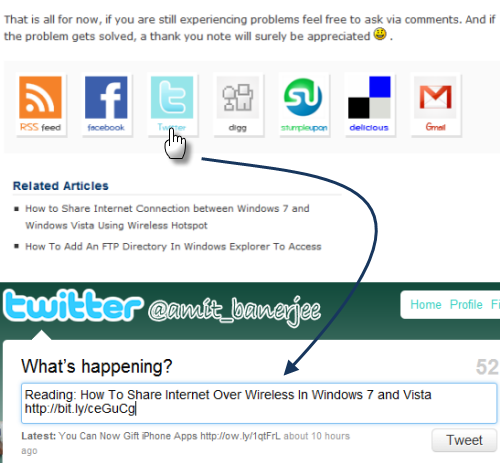
Add a Tweet this Button in Blogger template
1. First, create a backup of your Blogger template to revert to older design in case something goes wrong.
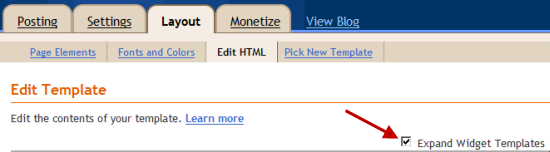
2. To add the “Tweet this post” link go to Layout > Edit Html and select the checkbox “Expand widget templates”.
3. Copy the entire content of the template in a notepad file and use “Find” from the menu to find
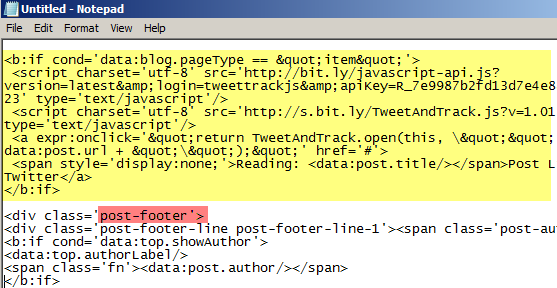
4. Paste the following code just above the “post-footer” class.
<script charset=’utf-8′ src=’http://bit.ly/javascript-api.js?version=latest&login=tweettrackjs&apiKey=R_7e9987b2fd13d7e4e881f9cbb168f523′ type=’text/javascript’/>
<script charset=’utf-8′ src=’http://s.bit.ly/TweetAndTrack.js?v=1.01′ type=’text/javascript’/>
<a expr:onclick=’"return TweetAndTrack.open(this, \"" + data:post.url + "\");"’ href=’#’>
<span style=’display:none;’><data:post.title/></span>Tweet This Post</a>
</b:if>
Customizing the Link with an Image
Now that you have added the link successfully, you can customize the link by adding a Twitter icon just before the link. Add the following code before </a> tag:
Both the above codes work with the most popular URL shortener Bit.ly and thus you can easily track important statistics about the performance of your blog posts on Twitter.
Tip: Add a Bookmark this page link in your WordPress theme.