Adobe’s Create PDF Lets You Create PDF Documents From Your Android Device
Creating PDF documents from your Android phone is not very easy, since none of the online office suites like Google Docs or Microsoft Office 365 lets you create PDF documents from the browser. You can always create Word documents (.doc) from your Android device but when there is a need to create a PDF document or convert an existing word document to PDF, you are stuck.
The good news however is that Adobe has recently released a new official Android app which lets you create PDF documents directly from your Android device, so you can pull out your mobile, create a simple PDF document or an invoice and send it to your client while you’re travelling or busy in an office meeting. There is more – the app lets you convert existing Word documents and other files formats to a PDF copy, wherever applicable.
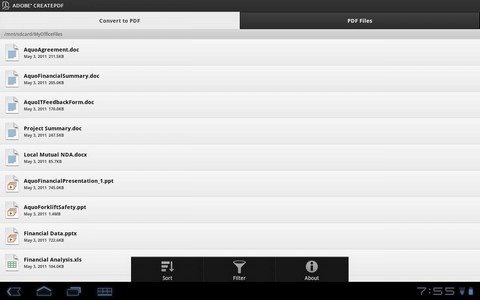
Adobe Create PDF for Android is not free and you have to pay a one time fee of $9.99 to use it. Here are a couple of features of Adobe’s PDF app for Android and why you should use it to create PDF documents from your Android tablet or mobile device:
Full featured document creation: The app comes with a giant list of features which might actually surprise you. For example: you can convert a Word document to PDF and preserve all the embedded hyperlinks, images or other media items without further having to reedit the document. All the documents created using Adobe’s Create PDF app are of high quality and optimized for online viewing. The PDF files are created using the same technology as used in Adobe Acrobat, so you will get the same high quality PDF document on your Android device, as created from Adobe acrobat on a PC or MAC.
Moreover, the documents are specially optimized for online viewing so that they have low file size.
File Manager: Adobe’s create PDF comes with a dedicated file manager for managing or creating PDF documents, so there is no need to use another PDF conversion app on your Android tablet or mobile. You can also convert word documents sent as email attachments to a PDF and store the converted document on your Android’s external SD. If a website has a link to a PDF document or has an embedded PDF file, you can use this app to download PDF from any webpage and view it directly using Adobe’s create PDF viewer.
Preserves links: The app preserves all the hyperlinks used in your original word document and does not change the formatting, so you get the same layout and feel of the document, once it has been converted to it’s corresponding PDF format. Additionally, you can share the document or send it to another app from the file menu.
Currently, Adobe’s Create PDF supports all MS –Word, Excel and PowerPoint formats along with Photoshop, Adobe Indesign, Adobe Illustrator, OpenOffice, Text and RTF. Give this a try and let us know your thoughts in the comments section.