Find Broken Links and Missing Images On Your WordPress Site
 Broken or missing links on any website creates a very bad user experience.
Imagine how would a visitor react when he finds a lot of broken links on your website or blog. How do you find broken links or track them on a regular basis? Should you check each and every link on your website and test them manually? or should you use a script or plugin to detect broken links on your website?
Typically, every website or blog has a 404 page which is shown whenever a visitor enters a wrong web address in the browser address bar. If your site visitors keep on getting the same 404 page on every other link, there is a high chance they won’t enjoy your website.
The cause of broken links can be many. Some examples are as follows:
1. You had a section on your website which was very popular a couple of years ago. You linked to that section frequently from your blog posts, service and sales pages. Now you have deleted that section and all the previous links that are present in old blog posts now return a 404 error.
2. You have changed your blog’s hosting provider and during the migration from a different content management system to a new one, your previous links are all broken.
3. You changed the permalink structure of your WordPress blog and now all the older permalinks return a 404 page, instead of returningg the actual page that’s on your site.
The Best Way To Fix Broken Links On Any Website
Whatever may be the case, broken links should be fixed and taken care of because search engines don’t love websites who have tons of missing links placed randomly across various pages. remember that search engines crawl the internal pages of your site through links and if these links are broken in the first place, search bots will have a difficult time crawling and indecing your entire site.
Furthermore, a large number of broken links on any website is a violation of Google Webmaster quality guidelines. Your site may be penalized for having a bad structure and you may lose organic rankings for your content.
Here are a few tools I would recommend using, if you want to regularly find broken links on your website:
Detect Broken Links On Your WordPress Blog With broken Link Checker Plugin
If your site in on the self hosted WordPress platform, install the Broken Link Checker plugin for WordPress. This is a very useful plugin which automatically checks the status of each and every link embedded within the pages of your WordPress powered site. Every post and page is checked on a routine time interval and the plugin will show you how many broken links were found, how many redirects are present on your site and which of the external links are either missing or broken.
When you get the list of all broken 404 links on your site, you can do three things:
1. Delete the link by hitting the “Unlink” button placed next to each link.
2. Delete the post or page that contains the broken link.
3. Mark the link as “Not broken”
Additionally, the plugin will also show you the anchor text and the target address, as shown in the following screenshot:

The plugin will not only check for links but it will also check whether there are any missing or broken images embedded within a page. If any missing URL of an image is found, the plugin will list the URL in the Plugin options page.
This is very useful when you want to find all the posts and pages of your website which have missing and broken images. I highly recommend this plugin for every WordPress blog.
Another advantage of broken link checker is that the plugin will periodically send email notifications, whenever a few missing links are found on your site. So you don’t have to check the plugin options page manually.
Find Broken Links On Any Website With Xenu Link Sleuth
While the broken links checker is very useful for WordPress blogs, websites that are hosted on a free hosting platform can not use it. This is because blogs that are hosted on BlogSpot.com, WordPress.com or Tumblr can not upload and install any script or plugin.
So how do you find broken links on your Blogger or Tumblr blog and fix them? Enter Xenu Link Sleuth – a powerful link scanning software which can detect 404 errors on any website and show broken redirects and missing images.
Using Xenu Link Sleuth is easy, all you have to do is enter the web address of your blog and hit the scan button. Xenu also lets you scan only a section or subdirectory of your website, so this is handy for those webmasters who have multiple subdomains running on the same web server. Using XENu Link sleuth, you can find 404 errors on a section of your website and your entire website as a whole.
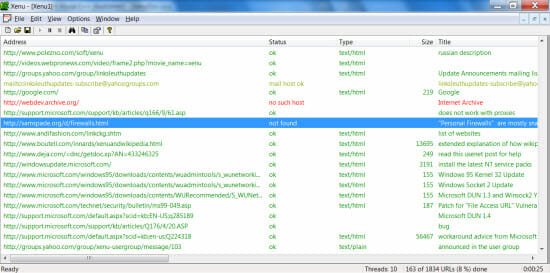
The biggest advantage of using XENU over free link scanning programs is that XENU lets you download your scan report as CSV, HTML or PDF – so you can complete the scan and download a sample report to work upon. Link verification is done on links, images, iframes, plugins, backgrounds and other HTML objects. The results are displayed hierarchically so you can filter them based on a criteria of your choice.