Turn Pictures into Comics Strips Online
Want to turn your photos into comics? Here are some free tools using which you can create cool comic strips from your images. You can add speech bubbles, animations and lots of more effects.
Create comics from Your Pictures using PikiStrips
Pikistrips is a wonderful tool which lets you upload photos from your computer or from a web URL and merge them into a comic strip (see example). You can then add a lot of cool effects such as – speech bubbles, pencil sketches, oil painting and much more.
To get started, sign up for a free account at Pikistrips and go to “Create”. Next, select a layout for the comic strip which you are going to create
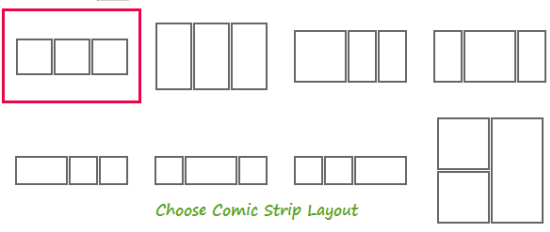
Choose comic strip layout
2. In the next step, select the size of comic strip and choose the background color and the cell background of the comic strip.
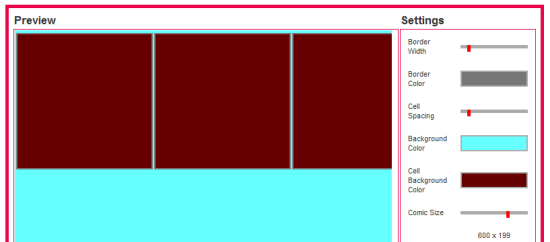
Choose comic size and colors
3. Now you can upload an image from your comuter and embed the image in the comic strip. You can also perform a search and select a photo from any publicly accessible web URL. The selected photos will be used in the comic cells as shown above.
4. To add a speech bubble in the photos, drag and drop a template from the “Speech bubbles” tab and add your text as shown below
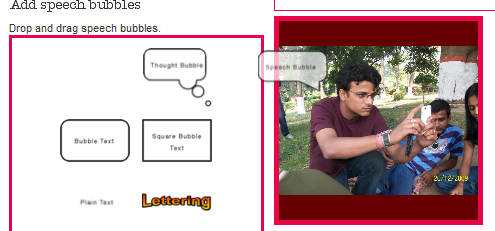
Add effects and speech bubbles in comics
5. Next, you can add a lot of more effects ts in the picture comic and give it your own feel. Some of the cool effects are – turning the image into pencil sketch, using an oil painting canvas, adjusting the colors, brightness and contrast, turning the image into grayscale and much more.
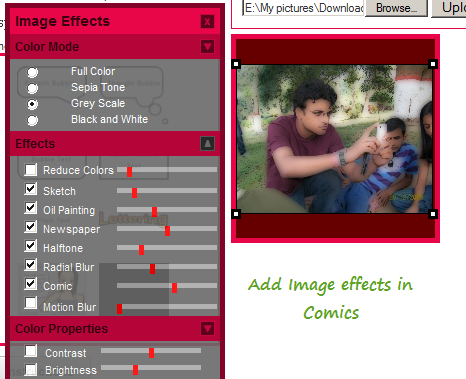
Add Image effects in your comics
Once the comic is ready, you can download the image in your computer or share it with your friends on Facebook, Twitter and a lot of social networking websites.
Create Cartoon Style Images with Befunky
Another similar tool is Befunky, which can be used to turn your images into cartoons, comics and funny clip arts. Using Befunky, you can create pencil drawings, turn an image into greyscale, create avatars etc.
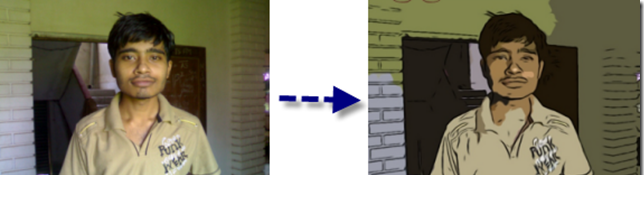
Turn images into Cartoons
Both the tools are free but I would prefer using Pikistrips as it has lot more features to customize the comic or image to my feel. If you are looking for a desktop application to create comics from your pictures, try FotoSketcher.
There are some other tools that you may like as well. Sometimes we need simple interface with latest features. These following tools come with all the essential options you need to turn pictures into comic strips online.
1] Fotojet

FotoJet is one of the best tools available in the market if you do not like the above-mentioned tool. It comes at free of cost. However, you need to spend some money to unlock all the options it offers. The premium version costs around $3.33/month/user if you buy it for a year. If you want to try the premium options for one month, you need to spend $6.99/user/month. The premium account holders can get tons of fonts, shapes, icons, badges, etc. to customize and enhance the comic and turn it into a single-page story. The best thing is it offers more than 800 templates. If you are a new comic book maker, you must need some inspirations, suggestions, and demos. FotoJet is awesome from that point of view. This is very easy to use this tool to turn your photo into a cartoon and customize it accordingly. You need to create an account as it offers paid subscription.
2] Comic Strip – Cartoon & Comic Maker
If you do not like to use an online tool and this is very convenient for you to use a mobile app, this option might be helpful for you. Comic Strip is available for android 4.0 or later version. You do not need a professional knowledge to get started with this application. It offers free text speech bubbles, preset icons with various texts, and more others. It is very easy to create an awesome storyboard with the help of this android application. The user interface of Comic Strip is pretty good and you should find all the options openly. Therefore, you do not need to spend a lot of time to understand all the options.
3] Cartoonizer

Cartoonizer is helpful when you need to convert image into cartoon. You can create a comic storyboard in this tool but it is quite time consuming for that job. Otherwise, Cartoonizer works smoothly and without any issue. No matter whether you have one photo or fifty, you can convert them all with the help of this online tool. The only drawback of this tool is you need to create an account to use this tool. Regarding the price, you can use it free of cost.
Not only online tools but also a mobile app is mentioned in this list. Hope they will help you a lot.