Blogs that are powered by the self hosted WordPress CMS often face a typical problem of hiding posts from the front page. There can be situations when you may not want to show specific posts on your website’s homepage. There are different techniques to exclude specific posts from WordPress homepage. This involves modifying the loop, publishing at an earlier date or using a custom template file for the index page of your website.
However, if you are no geek and need a simple way to exclude specific posts from your website’s homepage, here is a neat trick I recommend implementing.
Note: I have tested this trick on this blog and it works fine, as long as you are not using the default WordPress theme. In some themes, the loop is coded in such a way that this plugin might not work, so you should consult with your theme developer and get the problem solved.
Exclude Posts Of A Specific Category From Your Website’s Homepage
1. Download the Front page excluded categories plugin and upload it to your website’s wp-content folder. You will need an FTP program to upload the plugin files but if you do not have an FTP program installed on your computer, you can upload the plugin zip file from WordPress Administration area > Plugins > Upload.
2. Go to “Manage Categories” within your WordPress administration panel.
3. Create a new category. You will be using this category to hide posts from your site’s index page.
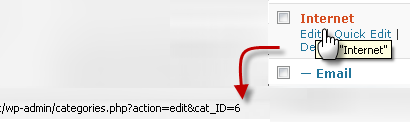
3. Note the unique ID of the category you just created. To know the Category ID’s of any of WordPress Categories, simply hover the mouse cursor over the category name and you will see the category ID in the browser status bar. An example is shown below:
4. Within your WordPress administration area, open the plugin editor and select the “FrontPage excluded Categories” option from the right top drop-down menu. Be extremely careful while you are editing a plugin file, it is advised to take a backup before proceeding.
5. Find the String $cats_to_exclude and include your category ID’s by separating Commas.
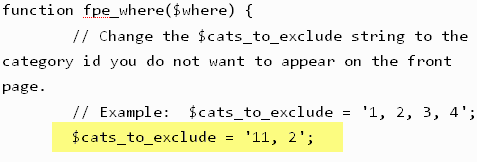
You can exclude only one category or choose to exclude multiple categories from WordPress home page. Just separate each category with a comma and update the plugin file.
When you are done editing the plugin, visit your site’s homepage and you will find that the posts that were assigned the specific category, are not showing up on your website’s homepage. This is because you have purposefully excluded all posts of a specific category from appearing on your site’s index page, thanks to the Front page excluded categories WordPress plugin.
What About Multiple Categories That Have been Assigned to A Post?
Fair question. The plugin goes to work even if you have assigned multiple categories to a specific post. Let us assume that you have excluded posts of “X” category from showing up on your site’s homepage. Later, if you create a post and assign three categories e.g “X”, “Y” and “Z” to it, that post will still be excluded and wont appear in your site’s homepage.
This is applicable to all the other archive pages if the same loop is active on the tag, category, author and date based archives. However, if all the archive pages are made up of differently coded loops, you’re out of luck.
Duplicate content issues
If your site is coded in such a way that multiple categories contribute to duplicate content issues, you should not use this trick. Better, never assign multiple categories to a post if your site’s permalink structure contains the category slug in the post URL.
In those situations, it makes sense to exclude posts of a specific tag from your site’s homepage. This involves tweaking the loop but it is actually worth it.
Do you know any trick or other plugin that does a similar Job or even better ?Share your ideas in the comments section.
 Do you use computers for more than 2 Hours a day ? You may be a Victim of CVS (Computer Vision Syndrome) . Long hours infront of computer can cause eye fatigue, blurred vision, headaches, dry or irritated eyes.Check out Some Effective Eye Exercises and the Reasons of Eye fatigue caused Due to Computers.