Change Windows 7 Logon Screen Background Without Any 3rd Party Tool
Let us see how we can change the Windows 7 logon screen with our custom image. We will use registry hack to carry out this change so that you do not need to use any other third-party app. Since this is a registry hack you need to be very careful. Prior to making any changes read our guide on how to back up and restore registry in Windows. This will help you restore your old registry settings.
Change Windows 7 Logon Screen Background Image :
1. Start registry editor. Open Run (Windows key + R) > type regedit > hit Enter.

2. Go to HKLM\Software\Microsoft\Windows\CurrentVersion\Authentication\LogonUI\Background (Note : HKLM stands for HKEY_LOCAL_MACHINE).
3. Find the key named OEMBackground. If it’s not there right-click on the empty space in the right pane and hover on “New” and then select “DWORD (32-bit) Value” to create one. Now give that key the name OEMBackground.

4. To open the “OEMBackground” double-click on it.
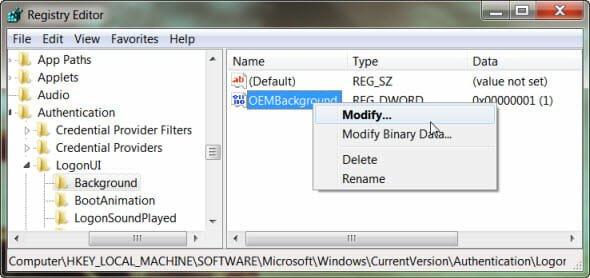
5. Change the “Value data” field to 1 and press OK.
6. Now open Windows Explorer and navigate to [Windows Drive Letter]:\Windows\System32\oobe . Now find a folder named “Info” and open it. You’ll find another folder within it named “backgrounds“. Open it. If you are unable to find any of the folders, you should create both of them first.
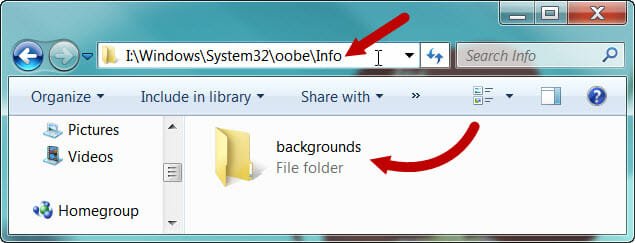
7. Copy the image (you wish to see as your logon screen background) to the folder “background” within the folder “info” (that you just created). One thing to note here is that the image size should be less than 256KB and the file should be JPEG.
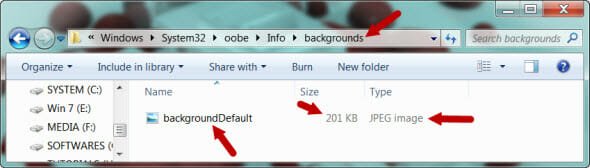
8. Rename the image as backgroundDefault.jpg. If the image dimensions are different to that of the screen resolution that you are using then the image will be auto adjusted to the fit the screen.
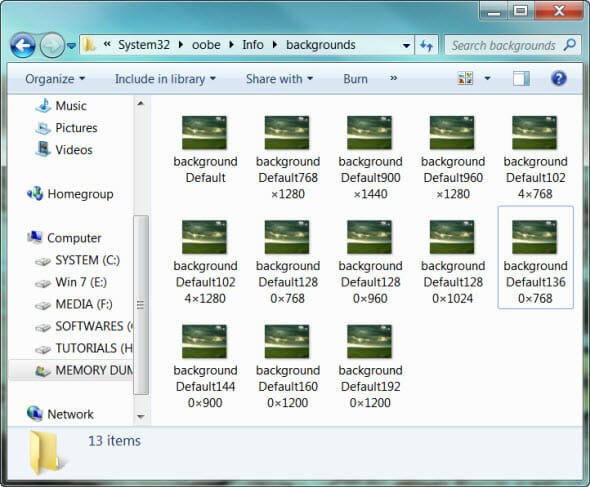
9. However, there is a neat workaround to this resolution problem. You can add up to 12 different files of different resolutions to negate this anomaly. The filenames should be backgroundXXXXXX.jpg where the XXXXXX refers to the image dimensions. The supported file sizes with proper filenames are listed below :
- backgroundDefault.jpg
- background768×1280.jpg
- background900×1440.jpg
- background960×1280.jpg
- background1024×1280.jpg
- background1280×1024.jpg
- background1024×768.jpg
- background1280×960.jpg
- background1600×1200.jpg
- background1440×900.jpg
- background1920×1200.jpg
- background1280×768.jpg
- background1360×768.jpg
[Also Read : Change Your Logon Screen to Vista Logon Screen in Windows XP]
Change Windows 7 Logon Screen Button Set :
It may be so that the buttons in the logon screen are looking dull in contrast to the logon screen background image you have chosen. In that case you may try altering the set of button color and texts to match it with the image. Follow the steps below to make the necessary changes.
1. Open Registry Editor. Open Run (Windows key + R) > type regedit > hit Enter.
2. Go to HKLM\Software\Microsoft\Windows\CurrentVersion\Authentication\LogonUI ( Note : HKLM stands for HKEY_LOCAL_MACHINE).
3. Now create a new DWORD (32-bit) Value here and name it ButtonSet.
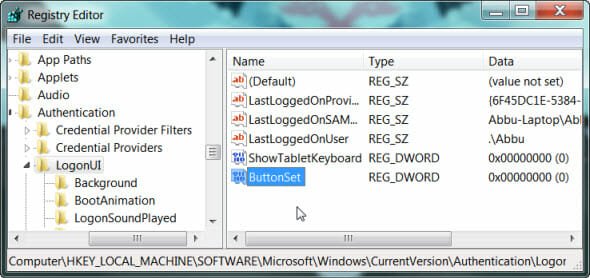
4. Now change its value to either 1 (darker text shadows and lighter buttons, meant for lighter backgrounds) or 2 (no text shadows and opaque buttons, this one for darker backgrounds); 0 is the Windows default. To change the DWORD value right-click on the DWORD value and select Modify.
You need to reboot your computer to make the changes take effect. Feel free to ask if you face any problems about the trick.
i want to change the position of the pasword box ………… like it is in the middle of the screen but i want it to be shifted to bottom left corner of the screen ………… pls reply me