Allow Anyone To Upload Files To a Folder in Your Dropbox Account

Dropbox is one of the best tools when it comes to backing up files or syncing them between multiple computers or mobile devices. I regularly use Dropbox to store important backups, sync my Firefox bookmarks and do a lot more.

One of the limitation of Dropbox is that it does not allow other users to upload files to your Dropbox account. Suppose you want your friends or blog visitors to upload images and other documents to a folder in your Dropbox account. In that case, can they upload the files without knowing your Dropbox account’s username and password. No they can’t !

As a workaround, you can create this simple browser uploader for Dropbox which will allow anyone to upload files to a particular folder in your Dropbox account. All you need is a web server that supports php.

Demo

To see the Dropbox uploader in action, please visit this project page and use the simple browser based uploader to upload a file from your computer. Then click “Upload” and the file will be sent to my Dropbox account.
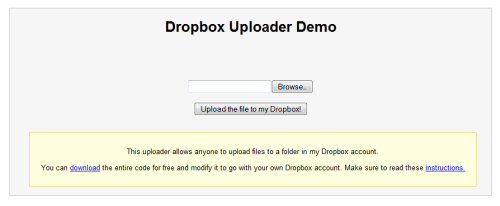
Dropbox Uplaoder- Allow anyone to upload files to your Dropbox account

Dropbox Uplaoder- Allow anyone to upload files to your Dropbox account

Download: You can download the entire source code and the follow these instructions to set the uploader working with your own Dropbox account.

How to Allow Anyone Upload Files to Your Dropbox account

1. Log in to your Dropbox account and create a new folder for storing the files uploaded by other users or that of your friends.
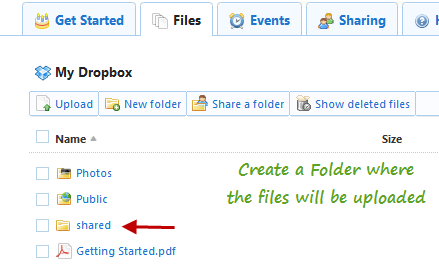
Create a shared folder in Dropbox to let other users upload files

2. Extract the package and you will get two files – index.php and DropBoxUploader.php. Open index.php in any HTML editor.

3. Go to line 48 and enter your Dropbox account username and password, as shown in the following image:
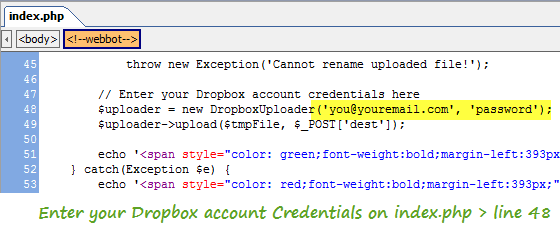
Dropbox uploader- Allow other users to send files to your Dropbox account

Dropbox uploader- Allow other users to send files to your Dropbox account

Note: Since the code is written in PHP, your username or password wont be visible in the page’s source code. There is nothing to worry !

4. Go to line 71 and enter the name of the folder which you created in step 1.

5. Create a new directory anywhere in your website and upload both the files ( index.php and Dropboxuploader.php) in that directory.

You are done !

Now pass the address of our Dropbox uploader page to your friends or to anyone whom you want to upload files. The browser uploader works with all types of file formats e.g text file, images, Zip and RAR formats, mp3, videos, word documents and so on.

Watch the Screencast

Here is a quick screencast which shows how the Dropbox uploader works. First I will upload the source files to a folder in my website and then use the browser uploader to upload a simple text document to my Dropbox account.

You may also like to read our earlier tip on how to use Dropbox to host a static website for free. If you have multiple Dropbox accounts learn how you can run multiple instances of Dropbox on Windows.

Thanks to Jaka Jancar for the hat tip.

Update: Added password protection

Some users suggested that it would be nice idea to add a password field so that spammers can’t upload files to your Dropbox account. I have added support for password protecting file uploads, download the new script and follow these instructions:

1. Open Index.php in an HTML editor
2. Go to line 27 and enter a password. This need not be same with your Dropbox account’s password.
3. Go to line 52 and enter your Dropbox account credentials.
4. Go to line 75 and enter the name of the Dropbox folder in value field
5. Upload all files in a directory of your web server.
6. Done !

Now pass the address of the page and the password to your friends and let them upload files to your Dropbox account.

I am trying to add multiple file uploads in the script. Will update this post if I am successful.

ADVERTISEMENTS

You may also like to read:

  • http://www.strictlyonlinebiz.com/blog Udegbunam Chukwudi

    Thanks for the notice. I’ve never used dropbox before but after reading this post, I might just give it a try. Looks like a good way of receiving files from blog visitors, friends etc ;-)

    P.S: For some reason your sidebar is showing beneath the comment form in Opera 10.60. You should check that out. Cheers ;-)

  • http://www.ampercent.com Amit Banerjee

    @Udegbunam : Yes, I made this one to let my site readers upload demo files to my Dropbox account, then I can download them using the desktop client. Thanks for the heads up regarding browser incompatibility, I will fix it soon

  • http://www.ampercent.com Amit Banerjee

    Thanks Nabeel, you should use Dropbox, it’s the best app ever to sync files between multiple computers and use an online storage !

  • http://ashrik.net Cary

    I’m getting a “Cannot create temporary directory!” error when uploading a document.

  • http://www.ampercent.com Amit Banerjee

    @Cary: Does your webhost support PHP and have you made that folder in your dropbox account in the first place?

  • http://ashrik.net Cary

    My webhost supports php. I have several working php pages. I created the folder in Dropbox first, then I updated lines 48 and 71 in index.php.

  • Shelly

    Binfer is a great option to send large files directly from computer to computer, without uploading to a server. You can send hundreds of files of any size with a simple drag and drop. Binfer will manage the transfers with auto resumes, encryption, notifications etc. Check it out: http://www.binfer.com

  • http://www.ampercent.com Soumen Halder

    @Shelly I tried opening the service and it froze my browser.

  • http://techiezlounge.com Shabnam Sultan

    I never used Dropbox but thinking of giving it a try.

  • Sathish @ TechieMania

    Will give it a try. And by the way this theme looks much similar to labnol. Have you bought this from Amit?

  • http://www.ampercent.com Amit Banerjee

    @Sathish: No, the theme is made by us, well does it really look like anyone else ??

  • Kyle

    Hey can anyone help me with the error, i run the script and get this:

    Error: Cannot execute request: Failed to connect to http://www.dropbox.com IP number 1: Permission denied

  • http://www.ampercent.com Amit Banerjee

    @Kyle: DOes your webhost support PHP ?

  • Bloggers Planet

    A great place to share stuff to your friend =)

  • Shelly

    @soumen: You need Java 1.6. Download the jar file and run it with Java

  • Pingback: Allow Anyone To Upload Files To Your Dropbox Folder

  • http://andheblogs.com Andy Rush

    Any way to password protect or require a code so that not ANYONE can upload?

  • Pingback: Allow Anyone To Upload Files To Your Dropbox Folder | Computer Technology

  • Jason Jang

    I get an SSL error.

    I’m running it on a MAMP server, running on a power Mac.

    I get this error:

    Error: Cannot execute request: SSL certificate problem, verify that the CA cert is OK. Details: error:14090086:SSL routines:SSL3_GET_SERVER_CERTIFICATE:certificate verify failed

  • Pingback: Dropbox Uploader: Daten in deine Dropbox schicken lassen

  • Kyle

    Any way to allow the selection of multiple files?

  • Jon

    keep getting this

    Parse error: parse error, unexpected ‘{‘ in /var/www/vhosts/xxxxx.org/httpdocs/drop/index.php on line 31

  • http://www.ampercent.com Amit Banerjee

    @Andy: Yes, I am planning to implement a password protected mechanism soon so that only users having the password can upload the files. I will update the post as soon as I am done

  • James

    I get the error:

    Parse error: syntax error, unexpected ‘{‘ in /blah/blah/dropbox/index.php on line 31

    Any ideas?

  • http://www.ampercent.com Amit Banerjee

    @james: The script is all fine and works! There must be some problems at your end or with your webhost. Please check

  • Pingback: Dropbox Uploader permite que otros guarden archivos en tu cuenta en Bitelia (Mac OS X)

  • Pingback: Dropbox Uploader permite que otros guarden archivos en tu cuenta

  • http://www.gadgetcage.com/ sidduz

    This is really new for me, tried it. Its working really well. Thnx a lot for sharing it and congrats for Linking up from Lifehacker and Addictive Tips.

  • anechoic

    I’m *already* able to get files from (and share with) invited friends — how is this different?

  • Pingback: CTRL+Z – Porque siempre es bueno pensar antes de actuar | CTRL+Z

  • http://www.starcatproducts.com Alan

    Is there a way to limit the file types to only images?

  • Bob

    I get the error:
    Parse error: syntax error, unexpected ‘{‘ in /blah/blah/dropbox/index.php on line 15

    The reason is my host (1and1) defaults to PHP4. To enable PHP5, I had to create a “.htaccess” file in the same directory as the Stuff My Dropbox php files with a single line of:

    AddType x-mapp-php5 .php

    Now it works like a champ

  • http://www.ampercent.com Amit Banerjee

    Thanks Bob for commenting and solving the errors, will be useful for other users who are also on php4.

  • http://www.ampercent.com Amit Banerjee

    @Sidduz: Thank you.

  • Pingback: Dropbox Uploader Allows Anyone To Upload Files To Your Dropbox Account | Lifehacker Australia

  • Christian

    Same error:

    Parse error: syntax error, unexpected ‘{‘

    If anyone finds a fix, please post.

  • Christian

    OK, for all of you seeing the “Parse error: syntax error, unexpected ‘{‘” error, your server is running PHP4, and the exception syntax used in the script requires PHP5.

  • http://joemasterson.com Joe

    Anyone know how to go about making this a multi-file upload? maybe some ajax that could add a “upload another file” button.

    PS
    This Work GREAT! I’ve been wishing for something like this a while, thank you!

  • Thorsten

    Hi Amit,

    I have made some (security-)changes to your script. If you want reply to my email.

    Regards,

    Thorsten

  • yoh

    I tried it on wampserver. But it said it cannot create temporary directory.

  • TC

    I created the folder on Dropbox but this is the error I receive. The shared folder name is ‘share’. Could that be a problem?

    Error: Remote directory must be a string, is NULL instead.

  • Jesse Fletcher

    HI I am just getting a blank white page when I implement this, is that a server-side issue? or am I screwing up?

  • http://www.garyeimerman.com Gary

    Is anyone else having issues uploading files over a couple of MB? It works perfectly with small files, but any MP3′s or zip files its uploads and then errors or just uploads and never appears in dropbox.

  • http://www.ampercent.com Amit Banerjee

    @gary: I am able to upload small mp3 files and ZIP files as well.

    @jesse: Does your webhost support php5 ?

    @toh: I don’t think it will work on Wamp.

  • Pingback: Allow anyone to upload files to your DropboxSocialblur | Socialblur

  • Oskar

    @Gary: PHP has a limit on maximal upload size I believe. It needs to be corrected in the php.ini of your provider (normally you don’t have access to it :-P) or set in code with:

    ini_set(‘upload_max_filesize’, ’20M’);
    ini_set(‘post_max_size’, ’20M’);

    @TC: your line 75 in index.php should look like this:

    I have the same problem as yoh and Cary; can’t create temporary directory. Anyone got a clue?

  • Oskar

    Oops :-) Not allowed to post HTML I guess :-) @TC: The value part of the img-tag should look like this:

    value=”share”

  • Thorsten

    @Oskar: are you on a hosted webserver? Normally you should be allowed to write into the /tmp-directory.

  • PTFool

    receiving the following error msg:

    Warning: mkdir() [function.mkdir]: No such file or directory in \\boswinfs02\home\users\web\b2087\ez.ptfool\drop\index.php on line 38
    Error: Cannot create temporary directory!

    Server supports PHP5 and the folder has been created in my dropbox account.

    Any help is appreciated

  • http://garyeimerman.com Gary

    @Oskar: Thanks I forgot to modify the post_max_size. I’m all good now. Much appreciated.

  • Jesse Fletcher

    @Amit, should have checked that first. Running 4.1 that wold be the problem thanks.

  • hah

    i’m on godaddy economy hosting. it says hosts php4 and php5, but my page still loads up blank?

  • Crazyhunk

    this is a really good script…
    though I do have a major concern… if someone looks at the source… he is bound to get my email and password to login… wouldn’t this be a huge risk… or is there a work around for this..

    Thank You

  • Pingback: White Wizard » Dropbox Uploader (Stuff I love!)

  • Pingback: Free Upload Files to any DropBox Account without putting Username, Password | Softtricks

  • Thorsten

    I have modified the script to make it a bit more secure and added a dropdown to choose between different directories. You can get my du_v3.rar here:

    http://dropbox.kingofcomedy.de/

  • Thorsten

    @Crazyhunk: you can’t see the php-code if you are viewing the site in a webbrowser.

  • Colorado Teche

    This is an awesome script!

    I took the password protection from this blog and the cool graphics from http://www.addictivetips.com/internet-tips/allow-anyone-to-upload-files-to-your-dropbox-folder/ and combined them into my own: http://dl.dropbox.com/u/8328259/dropbox.zip

    I also put all the configuration stuff AT THE TOP and I included the cert from the site for those people that are getting cert errors.

    Finally, if you are on a hosting provider, you are limited by upload_max_filesize and post_max_filesize which are set in php.ini.

    Thanks all!

  • TC

    Oskar, my line 75 reads

  • http://ashrik.net Cary

    Any ideas what’s causing the “Cannot create temporary directory!” error? The error is written into the php code so it must be in anticipation of a possible scenario. What’s lacking on the server side?

  • Lake

    Two words: you rock!

    As a teacher, I’ve been dying to use Dropbox for online submissions from students. This has enabled me to quickly set up folders for each class and password protect them if things get bad. Multiple files will be a major bonus if that happens, but for now, I want to extend my sincere thanks. You saved me from a year of inbox-flooding email attachments.

    Thanks, and good luck with future upgrades!

  • Thorsten

    I have optimized the design of my script with the background-image from addictivetips.com too. My version #4 (incl. reduced code) is available here: http://dropbox.kingofcomedy.de/ :)

  • shevaz

    i have a problem with this script, i want upload with my iphone, but when i go to website, button for choose document it’s grey, disabled!! grrr
    please help me, with a solution.

    thnks all,

  • shevaz

    see this https://www.cliqcliq.com/support/quickpic/#web-app-integration

    i want upload all files, not only images, i want upload all files *.*

  • Pingback: Dropbox-Uploader – Dateien per Script nach Dropbox hochladen | tagdocs.de

  • Pingback: 2010/08/30に気になったこと | debeso

  • Pingback: Teaching with DropBox | Jason T Bedell

  • thedude

    add me to the list of people that are getting the dreaded Cannot create temporary directory!” error. any ideas? i am running this on my personal windows apache server.

  • Mikecp23

    I keep getting this error.

    Warning: mkdir() [function.mkdir]: No such file or directory in D:\Hosting\2694903\html\upload\index.php on line 37
    Error: Cannot create temporary directory!

    I did everything correctly. I have my site hosted on Godaddy.com, standard economy hosting. If anybody can help, let me know.

    Here’s my site: http://uploads.blueicegraphix.com

  • http://www.ampercent.com Amit Banerjee

    @Mikecp23: Make sure your webhost supports php5 and the web dir has all the permissions (777)

  • tom

    Is there any way to stop people from uploading large files or some type of files?

  • Mikecp23

    Ok called Godaddy and tried to work things out. But it seems I got a new error.

    Error: Cannot execute request: SSL certificate problem, verify that the CA cert is OK. Details: error:14090086:SSL routines:SSL3_GET_SERVER_CERTIFICATE:certificate verify failed

    I’m running on a windows server. Its seems to trying to upload to a https protocol, and is causing an error.

    I appreciate the help so far @AmitBanerjee

  • http://www.theadminsoffice.com Sherri

    This is great! My clients are always trying to burn files to CD and send them via snail mail – and are not open to the idea of learning anything “too technical-ish” .. this is a perfect solution!

  • Thorsten

    @Tom: have a look at my version #5 @ http://dropbox.kingofcomedy.de. Currently you are able to allow just some file-extensions. A filesize-limit is not yet implemented.

  • Colorado Teche

    All,

    I took my code and put it on googlecode as a project. You can see it here:

    http://code.google.com/p/stuffmydropbox/

    Furthermore, I have a wiki page that answers some of the problems people are having here (although the version on the google code project is different than the one above, so I can’t answer all problems on the web page):

    http://code.google.com/p/stuffmydropbox/wiki/Troubleshooting

    For example, it shows how to fix the SSL problem and the mkdir problem.

    Specifically: SSL issue:
    This occurs using the version of the “stuffmydropbox” that does web scraping. You’ll have to download the cert from https://www.dropbox.com and then upload the cert to your web host and then add this line right before the code uploads the file:

    $uploader->setCaCertificateFile(‘/path/to/uploaded/cert’);

    be sure to change the path to the uploaded cert

    The mkdir problem means that the web server can’t make the directory. You’ll want to hard code in the directory it should make (it is trying to create on in ‘/tmp’ but you don’t have permission to /tmp on every web host. Find the /tmp line and change it to a path that exists on your web server or a path that you know you have permission to.

    —-

    It is hard to know what version everyone is using… however, I should be able to answer people’s questions if they use the version from google coede.

  • Pine

    Googlecode links are not working?!?

  • Therese

    Colorado Teche, I can’t seem to be able to view your website, it says that your pages are forbidden.

    I need answers to my questions :D

    I tried following the suggestion of making a static webpage using dropbox, but it seems that the link to page with a .php extension simply downloads it, whereas if I use .html, it works, but then again the dropbox uploader is in .php, I tried the .htaccess way, but I can’t seem to make it work,
    So I just looked for a free php hosting site, and I have problems with the mkdir() I followed what you said on hardcoding it and changing /tmp to something I can access, but I’m not sure if I’m doing it the right way, can you have a step by step instruction? What I did was I made a new directory, then changed the code of instead having /tmp, I changed it to the name of the directory I made. I don’t think I’m doing it right :))

    Help! :D

  • Thorsten

    I have just uploaded version 0.6 of my script. New “features”: Multi-File-Upload, Filesize-Limit, etc.

    http://dropbox.kingofcomedy.de/

  • Tricia

    Hi, I couldn’t upload. I receive the following message:

    Error: Cannot create temporary directory!

    I’m using the new script with password, I modified the password, I modified the Dropbox username and password and I modified the name of the folder in the Dropbox.
    Any idea? Thanks

  • Tricia

    I forgot… I use my Mac with Snow Leopard 10.6.4… all the examples/demo are with Windows…

  • Adam

    Could you technically use this instead of dropbox a private FTP server?

  • Steve

    Thorsten, I like your modifications!

    Not sure how much control you have over the upload process. Is it possible to add a progress bar to show upload progress? If a file already exists in the dropbox, can the new upload be renamed with a timestamp added to the extension instead of overwriting the existing file?

    Thanks

  • Thorsten

    Hi Steve,

    to show the upload-progress is not possible, afaik, because PHP doesn’t know the real filesize while a file is being uploaded. And the PHP-Script doesn’t know if a file already exists, sorry. It would definitely be easier if the Dropbox-API could be accessed by everyone without registration.

  • osmik

    Every time I try to upload a file I get the error “Cannot create temporary directory!” How can I solve this?

  • Ryan

    Large files do not upload and I get no error. A 25MB file just seems to time out. I have increased the timeout on my server. The script is worthless if you can’t upload large files.

  • Joe

    Also having trouble with large files. I work with video, so my files are too big to email. Anything smaller can be emailed so there’s no point in letting other people upload email-able files to me. Help!

  • http://www.ampercent.com Amit Banerjee

    @Joe: Can you give a hint on the file size ?

  • Adam

    I am getting the error now Error: Cannot rename uploaded file.

    Please Help!

  • http://www.techtipsgeek.com Tanmay

    You can also automatically upload the scheduled WordPress Database backup files to your Dropbox: http://www.techtipsgeek.com/schedule-wordpress-database-backup-to-dropbox-account/10643/

  • http://digitaldoyle.com DigitalDoyle

    Thanks for this DropBox solution.

    However, I too am having timeout issues with larger files. Smaller ones go up very quickly with no problems, but we really need to be able to accept larger files from our clients. The test file was a 10mb jpg. If I’m having timeouts with our very quick internet connection, clients with much slower connections will not be able to use this solution.

    Any idea how to get around this challenge?

    Thanks much.

  • http://www.ampercent.com Amit Banerjee

    @DigitalDoyle: Sorry, but we have tested this app with small video files with size more than 10 MB? Are you facing the error repeatedly ?

  • Ryan

    The file size I was testing with is about 25MB. For example, we are starting to use Google Apps a lot and their limit is 25MB. Less than 25 MB file. That means 50MB, 100MB, 200MB. I think this script would be very powerful if it consistently worked with large files. A progress bar would be nice too.

  • http://www.ampercent.com Amit Banerjee

    @Ryan: I understood the issue but the problem here is the server timeout and honestly, I have no idea how to increase the timeout time limit. If anyone can come up with an idea to increase the timeout; it would be great !

  • Ryan

    I used a dev server on which I manually upped request timeout to 120 seconds. The timeout on the page occurred before my set timeout. I did not receive an error it just stops loading and I don’t get the red success alert at the top of the page. I was thinking I just had to run it on a server with a longer timeout but that does not seem to be the case.

  • http://digitaldoyle.com DigitalDoyle

    Amit,

    Yes. I’m getting it even on files as small as 2.7mb. Perhaps it’s a server timeout setting on my side of things?

    Thanks for your help. Much appreciated.

  • http://digitaldoyle.com DigitalDoyle

    Amit,

    I’m now getting this message: “Error: File was not successfully uploaded from your computer.”

    The file is on my local hard drive and I have a fast internet connection. That error message is not in the files you’ve supplied, so it must be coming from WordPress.

    Wish I understood where the problem was coming from.

    But thanks again for your help. If I can get past this issue, it looks to be a perfect solution for us.

  • http://digitaldoyle.com DigitalDoyle

    Amit,

    I did some poking around with Fiddler and discovered that the problem seems to be with my hosting provider. My web server fails to complete and the Dropbox servers continue to try to initiate connections which time out at about 30 seconds and then give a 504 result. That points to a problem with it not getting the response it needs from my web server that’s upstream. Tech support is looking into the problem now.

    Just fyi, the largest file I could get to upload was only 1.7mb. A file 2.4mb failed.

    Bottom line is that I don’t think this is something you can fix, but I appreciate the confirmation that 10mb+ video files will work with your solution.

    Regards,

    Doyle

  • http://www.ampercent.com Amit Banerjee

    @Doyle: Yes, in my hosting service (Doreo) I could upload small video files of size 10 MB.

  • http://dropitto.me/ DROPitTOme

    There is now a free service based on this lovely script:

    DROPitTOme – Securely receive files from anyone to your Dropbox.

    http://dropitto.me/

    Happy Dropboxing!

  • Noah

    AWESOME SCRIPT :). Very handy dealing w/files from clients.

    Can’t wait for multi-file upload. One question though, how can we integrate a progress bar? This would seem like a very important function.

  • Nick

    Does anyone get these errors?

    Warning: preg_match_all() [function.preg-match-all]: Internal pcre_fullinfo() error -3 in /usr/local/www/upload/DropboxUploader.php on line 129

    Warning: preg_match() [function.preg-match]: Internal pcre_fullinfo() error -3 in /usr/local/www/upload/DropboxUploader.php on line 139

    This is a new install and I’ve been troubleshooting this for quite awhile and I haven’t come up with a solution. Googling only brings results of an issue a year ago when dropbox changed domains for where to upload to.

  • Frank

    I set just about every folder I can find to 777, and also manually created each exact path on my server, yet I continue to get that “Cannot create temporary directory” error message.
    Same error on both the stuffmydropbox version and the kingofcomedy version.
    Before I pull out all my hair, am I missing something? Any good tips of other things I need to look for?
    Thanks.

  • http://abdneco@webs.com Gyozo Kovacs

    Hi

    I made a website to help my university freind to collect information about our subjects.

    I used your tool to change dropbox so everybody can upload but as Im not really good and pritty new to website design I used this free web page creator at webs.com.
    I really need this dopbox to include on our page so peopel can easily uplod files but dont know how to do it.
    If you could help me the whole Aberdeen university economic course would be greatfull to u :)

    BEST REGARDS

    Gyozo Kovacs

  • agelos

    i get this message

    “The page you were looking for doesn’t exist.

    You may have mistyped the address or the page may have moved.”

    can you help me please?
    i create a new folder in my dropbox with the name “musicwave”
    i put the name in the line 71
    and i put my email and my password.
    whats wrong?

  • Dusibello

    You, sir, are my hero. Wonderful tool. Many many thanks.

  • defcan

    The ability to upload select multiple files/folders would be awesome!

  • saqib

    thanx 4 sharing that software i never used this software before.

    latest news

  • Kelly

    what could go wrong if the server fails?

  • http://www.ampercent.com Amit Banerjee

    If the server fails then the file is never uploaded to your Dropbox account. When the file has finished uploading, you are shown a notification that the file has been sent to Dropbox.

  • Thomsen

    I get this error:

    Error: Cannot create temporary directory!

    Any solution for this?

  • Thomsen

    I would really like it, if someone chould help me.

  • http://www.latestsarkarinaukri.com sanjeev@sarkarinaukri

    Thanks. very nice.

  • aldo

    I get this error
    Error: Cannot execute request: SSL certificate problem, verify that the CA cert is OK. Details: error:14090086:SSL routines:SSL3_GET_SERVER_CERTIFICATE:certificate verify failed

    i am using win 7 and xampp. please help me

  • http://www.allverdig.no Jens Fredrik Allworthy

    Perfect – thanx!

  • esku75

    1000 thanks you are great :)

  • Clesi

    How can you send to the public folder and not shared?

  • DPROC

    Would there be any way to add a progress bar? I love this script and have been putting it to use a lot! The one complaint I have gotten is the people don’t know if it is doing anything until the file either uploads or fails.

    Any help?

  • http://www.gaming-portal.webs.com Samarth

    Hi all,
    I kinda need some help. I’m a kid so please don’t mind me. I’m using a free hosting service- http://www.webs.com. I uploaded the files to my file manager and then tried to access the page i.e. http://www.gaming-portal.webs.com/index.php. Only the coding of the script was coming. What should I do next?

  • Jonathan

    I am trying to create an upload page for my website that allows my students to input their first and last names, email address, and upload their projects to my dropbox, how would I go about doing this?

  • Js

    Great post, thank you very much!

    I ran into the SSL certficate problem too and found a very good explanation on how to fix it:

    http://unitstep.net/blog/2009/05/05/using-curl-in-php-to-access-https-ssltls-protected-sites/

    Best regards,
    Js

  • Hilleary

    I’m using Thorsten’s V6 with one added slot each for a total of 5 files (or 5 links) per upload. It works great. I’d love to find a version that adds a text field to the form and uses the contents of that field to rename files (“text1.xxx, text2.xxx, text3.xxx”) after upload, but retains original filename extensions.

  • http://dropbox.kingofcomedy.de Thorsten

    @Hilleary: so you would like to have a text-field after each upload-/link-field? I might integrate that feature for you. Let me have a look at it later this week.

  • Hilleary

    @Thorsten: That would be fantastic!

    I only need one (required) text field for the whole form, the contents of which then becomes (or is pre-pended, but not appended) to the filename for each uploaded file in that batch (if replacing the original filename, it would need to also add sequential numbering to differentiate between files in that upload and keep filenames unique (text_1.xxx through text_5.xxx). If pre-pending, numbering would be unnecessary.) I’d like to preserve the original filename extensions, though.

    I’m using this for uploads of images of prizes to be considered for inclusion in a charity auction. Users are volunteers gathering and submitting prizes. (The auction itself will run on an existing auction platform; this is just the prize-gathering phase). Prize info (except images) is submitted through a Google docs spreadsheet form, and images separately through this form. To help me match up images with their respective prize listing in the Google spreadsheet, users are are supposed to name image files with a descriptive word or phrase we’re calling the Prize Name, and include that in filenames for all files associated with that prize, but experience so far shows relying on users to do that is problematic.

    Making this step more user-friendly will force filenames to be consistent and sortable and eliminate the possibility of unidentifiable images. My installation is at mmf-auction.org/images if you want to see it.

    The more I think about it, replacing and numbering (rather than pre-pending) seems better; otherwise names could get pretty long and funky.

  • Hilleary

    @Thorsten: All the same considerations would hold true–more so, in fact–for images acquired from links. With the current arrangement, there is no control whatsoever over filenames of linked images, which could turn into a headache if many are submitted that way.

  • Thorsten

    @Hilleary: ok, I have added an extra-field called “file-prefix” in my test-version. But what now? Can you give me an example of how the files should get renamed?

  • Hilleary

    User types “Ham Sandwich” in the field, chooses five image files (or pastes five image URLs), types her password, and hits submit. The five image files appear in my dropbox folder as ham_sandwich_1.xxx, ham_sandwich_2.xxx, etc. through ham_sandwich_5.xxx. Magically, they get renamed all the same, but with numbers to make filenames unique, and retaining their original extensions, but entirely replacing their names. As a slightly less desirable alternative, they could all just have “ham_sandwich_” tacked onto the beginnings of the existing filenames.

  • Thorsten

    Ok, understood. :)

    But maybe it would also be better to append a randomly generated text (6-10 characters, or more) after the number to make sure no files are overwritten if someone else used “Ham Sandwich” in the new field?

  • Hilleary

    Good idea!

  • Hilleary

    Especially in the case of the same user’s subsequent submission(s) using the same Prize Name. For example, a submission of files followed by another of links. Come to think of it, there is probably a high probability of this.

  • Hilleary

    I don’t suppose the uploader can check the target folder for duplicate filenames and, if found, resume an existing number sequence of that filename.

  • Thorsten

    @Hilleary: download a test-version from http://dropbox.kingofcomedy.de/. :)

  • Thorsten

    @Jonathan: have you already tried a dropbox-upload-script on your webserver? It should be no problem to add three more fields (firstname, lastname, mailadress) to an upload-script. The script might create a new folder like “DOE_JOHN_JDOE_AT_GMAIL_DOT_COM” in your dropbox for every student.

  • Hilleary

    @Thorsten: It looks good. Can I make the file-prefix field be mandatory? It doesn’t seem to be.

  • Hilleary

    @Thorsten: I’ve been testing it, and it’s almost perfect for my needs. All that’s missing:

    1) A way to prevent files being overwritten when the same file prefix is used again (such as your excellent idea to append a random string after the sequential number, or a way to check the target dropbox folder for a filename before it is used again, and if so, resume the added number sequence from there) and
    2) A way to make the file-prefix field mandatory.

  • Thorsten

    @Hilleary: afaik it is not possible to check the dropbox-folder before uploading. Check my new test-version which I have uploaded some seconds ago.

    http://dropbox.kingofcomedy.de

  • James

    Why not just timestamp them?

  • Thorsten

    First I thought about using the timestamp too, but: it might be a problem if two students are using the same file-prefix at the same time. Not very likely but possible. I have used a md5-hash instead.

  • Freida Wildman

    some really wondrous work on behalf of the owner of this site, dead great subject matter.

  • http://www.rsaffi.com Ricardo Saffi Marques

    So am I the only one that noted that the script only check the password integrity AFTER the whole file has been uploaded? If someone mistype the pwd and submit a large file, he/she will only know after the upload is completed. He/she will have to upload again. Any way to check the password before the submission of the form?

  • http://www.rsaffi.com Ricardo Saffi Marques

    Nonetheless a hell of a great job putting this together. Thumbs up! ;-)

  • Thorsten

    I’ll make a final version later this week, but I don’t have the time (at least at the moment) for a proper documentation, sorry.

  • Thorsten

    I have just released my final version v7. You can find the changes in the readme.txt.

    http://dropbox.kingofcomedy.de/

  • http://www.svab.sk/dropbox Svab

    I found this now and it is amazing. On my site I use your 1.1.5 version of script. I translate it for me and use it for send file to specific folder named PrintQueue. All files (doc, xls, pdf, jpg etc..) are automaticaly printed by default printer on my home computer. I use eprint.vbs and it works perfect. I just upload file from my blackberry or some computer and in my home i have printed file.
    Your nev versions with renamed options and multiple file upload or link option is for me not necessary.
    Many thanks for your grat work.

  • Lunas Lama

    I get the same error as many, “can’t create temporary directory”.
    I uploaded the php’s on funpic.de.
    It is frustrating. Why does it won’t work??

  • http://marlboro-nanto.org/upload Eytan

    This doesn’t work (with or without password). The file is never uploaded to Dropbox.

  • Frank

    I set just about every folder I can find to 777, and also manually created each exact path on my server, yet I continue to get that “Cannot create temporary directory” error message.
    Same error on both the stuffmydropbox version and the kingofcomedy version.
    Am I missing something? Any ideas what I should look for?
    Thanks.

  • http://dropbox.kingofcomedy.de Thorsten

    I’ll try to find a solution in my next (kingofcomedy)-version in the next days. Instead of writing to /tmp/ it should work if the script is writing directly to the script-folder.

  • Thorsten

    Please try version 0.8.

    http://dropbox.kingofcomedy.de/

    The /tmp-directory is not necessary anymore. The temporary files are saved to the script-directory now. The webserver-user needs the rights to create files/folders in this directory, of course (777 should definitely work ;)).

  • http://www. Frank

    Hello. I just tried the version 0.8.

    Set the script folder to 777 (the folder in which the script resides).

    The file seems to upload (or at least it waits while it appears to upload), then the error message is displayed:

    Cannot rename uploaded file.

    I poke and prod and tweak with no luck.
    PHP version is 5.1.6

  • HJE

    Error: Cannot create temporary directory!

    That’s the error I get and I don’t know what to do.
    Thank U

  • Thorsten

    @HJE: are you using my version 0.8? Is the folder set to 777 (the webserver-user need the rights to create folder/files)?

    @Frank: weird. I’ll see what I can do.

  • HJ

    Hello,

    yes I use the newest Version and the rights are 777.

  • Imran

    Keep getting this error message :

    *****************
    Warning: mkdir() [function.mkdir]: Permission denied in D:\Hosting\5161110\html\gen_upload1\index.php on line 120

    Error: Cannot create temporary directory!
    *****************

    I am using the following:

    - GoDaddy Hosting account with PHP 5 enabled

    - Version 0.8 of the script

    - User has 777 rights.

  • Thorsten

    Weird. If the folder is set to 777 it should be possible for every user to create a subfolder. I’ll see if I can find a solution.

  • http://botticelliportraits.com Brian

    Hi,

    I’ve been looking for a script like this and was very glad to come across this one. However, I am getting this error:

    Parse error: syntax error, unexpected T_IF in /home/content/b/o/t/botportart/html/botticelliportraits/upload/du/index.php on line 27

    Any ideas?

  • http://christiedaniels.net Christie

    anyone know how to add a simple email receipt function to this? (i’m using it to collect student papers and i want them to be able to see prove their file was uploaded…)

  • Thorsten

    @Christie: it is no problem to include a mail-function, if your webhoster supports this function. I’ll include this feature in the next test-version.

  • Jon

    This script is awesome. Ditto on the email receipt functionality. If you could provide a simple template, that would be great. Thanks!

  • http://dropbox.kingofcomedy.de/ Thorsten

    I have just uploaded a new test-version with email-functionality. Please download and test it:

    http://dropbox.kingofcomedy.de/

    Thanks.

  • SirX

    I get this error

    Error: Cannot execute request: SSL_write() error: error:140943FC:SSL routines:SSL3_READ_BYTES:sslv3 alert bad record mac

    Any ideas?

  • http://www.cubewebsolutions.com.au Jason Rhodes

    Great project Thorsten. Got a quick question. I have the script running on one of my pags, and if I have 3 file upload fields on the page, only the first 2 of the 3 upload… if I have 4, then the first 3 upload etc… always seems to not upload that last one in the list.

    Any clues?

  • Thorsten

    @Jason: open the index.php and replace “$c<($fields-1)" with "$c<$fields".

  • talon

    @Thorsten: I’m really loving your script, suits my needs perfectly! Just one issue though, I can’t seem to get email notifications working correctly and keep getting this error:

    SMTP Error: Could not connect to SMTP host. Mailer Error: SMTP Error: Could not connect to SMTP host.

    I have only edited the index.php to provide mail server/login info, should I be modifying the phpmailer and smtp .php files too? Could you please let me know which files I should be editing?

    Thanks again!

  • Lunas Lama

    I get this error: “DropboxUploader requires the cURL extension.”
    What can I do to fix that problem?

  • Thorsten

    @Lunas: ask your hoster to install the cURL-Extension for PHP.

  • Lunas Lama

    @Thorsten: Thank you. They have cURL but wont activate it for free user. Do you know any good hoster?

  • Pingback: scam website hosting

  • Pingback: Get The Most Out of Dropbox

  • Pingback: Service To Allow Dropbox Upload For Non-Dropbox User | Click & Find Answer !

  • Pingback: Ons Kookboek is en blijft dé kookbijbel van Vlaanderen ! Standaard Boekhandel 2013 , Lekker koken en genieten van makkelijke en heerlijke keukenrecepten uit 3.000 kookboeken plus originele, gezonde recepten uit ons eigen online kookboek.

  • Pingback: Wettbüro Bwin

  • Pingback: other

  • Pingback: HESI test prep

  • Pingback: Get Facebook Likes

  • Pingback: web hosting

  • Pingback: casino

  • Pingback: Anpflanzen

  • Pingback: Maple Kirchman

  • Pingback: Jettie Applebury

  • Pingback: Lawerence Koso

  • Pingback: Richard Steel

  • Pingback: Billie Pinsonneault

  • Pingback: Taylor Boston

  • Pingback: Willy Vankilsdonk

  • Pingback: Donald Ojano

  • Pingback: Junior Clair

  • Pingback: Edward Marsili

  • Pingback: Truman Malicoat

  • Pingback: Madison Zetzer

  • Pingback: Hobert Tamlin

  • Pingback: carpet cleaners calgary

  • Pingback: Christel Neiswander

  • Pingback: Kellee Erdelt

  • Pingback: Herta Zeegers

  • Pingback: Shawanda Grigalonis

  • Pingback: Neva Robinsons

  • Pingback: Antonio Plumadore

  • Pingback: Kaye Bey

  • Pingback: Francesca Bickel

  • Pingback: Damian Sanschagrin

  • Pingback: Diego Kneisley

  • Pingback: Hank Dadson

  • Pingback: Gino Salaam

  • Pingback: Glory Parent

  • Pingback: Elvin Lavalle

  • Pingback: Fritz Garlinger

  • Pingback: Roy Bernath

  • Pingback: Gary Zeliff

  • Pingback: Jordon Musco

  • Pingback: Ailene Ellingwood

  • Pingback: Tarra Picini

  • Pingback: Hermina Strine

  • Pingback: Victoria Hartnett

  • Pingback: Derick Pecue

  • Pingback: Lacy Almon

  • Pingback: Gilberto Frietsch

  • Pingback: Morris Swank

  • Pingback: Belkis Pavick

  • Pingback: Dion Unzueta

  • Pingback: Dirk Rakyta

  • Pingback: Horacio Maten

  • Pingback: Leonor Schramm

  • Pingback: Audria Takashima

  • Pingback: Kristopher Trego

  • Pingback: text your ex back review

  • Pingback: Dale Debrito

  • Pingback: Dora Saintignon

  • Pingback: Cameron Parriera

  • Pingback: Lucien Meech

  • Pingback: Justa Onley

  • Pingback: Elene Lenarz

  • Pingback: Gerard Yoders

  • Pingback: Natalia Meeroff

  • Pingback: Shantay Degravelle

  • Pingback: Ammie Vanschaick

  • Pingback: Sonny Dockus

  • Pingback: Alva Mcdougal

  • Pingback: Shirly Paparella

  • Pingback: Fredia Machinsky

  • Pingback: Florencio Juvera

  • Pingback: Tim Septon

  • Pingback: Sheryl Churchman

  • Pingback: Rudolph Boero

  • Pingback: Audrea Napps

  • Pingback: Nevada Entrekin

  • Pingback: Tracy Veitinger

  • Pingback: Rickie Jerde

  • Pingback: Marquis Lingberg

  • Pingback: Brant Hettes

  • Pingback: Rayna Botha

  • Pingback: Dominic Breaud

  • Pingback: Alda Dzinski

  • Pingback: Carlene Mede

  • Pingback: Patrina Maccarone

  • Pingback: Letisha Fleurilus

  • Pingback: Alonso Monje

  • Pingback: Annetta Malafronte

  • Pingback: Georgine Schmiel

  • Pingback: Ruben Ghant

  • Pingback: Athena Dibello

  • Pingback: Anja Madina

  • Pingback: Angelo Zientek

  • Pingback: Milton Agrela

  • Pingback: free website analysis

  • Pingback: Alvin Schelp

  • Pingback: Andre Howson

  • Pingback: Arron Flebbe

  • Pingback: Nichole Baeskens

  • Pingback: Roman Olivers

  • Pingback: Venessa Naschke

  • Pingback: Stephan Nicklaw

  • Pingback: Carry East

  • Pingback: Hassan Steenberg

  • Pingback: Kimbery Whitfield

  • Pingback: Chung Miessler

  • Pingback: Donette Mail

  • Pingback: Newton Laa

  • Pingback: Clint Gloyd

  • Pingback: Sherie Lagesse

  • Pingback: Valentin Rhodes

  • Pingback: Soo Segelhorst

  • Pingback: Chieko Konopski

  • Pingback: Winfred Hodermarsky

  • Pingback: Jon Altmann

  • Pingback: Raina Piefer

  • Pingback: Henry Melichar

  • Pingback: Sherwood Jobs

  • Pingback: Rafael Ton

  • Pingback: Hector Roop

  • Pingback: Eladia Humbard

  • Pingback: Voncile Huger

  • Pingback: Carolin Lakner

  • Pingback: Lulu Berdy

  • Pingback: Louie Hardel

  • Pingback: Anissa Sawaia

  • Pingback: Donnette Peaslee

  • Pingback: Valda Shufelt

  • Pingback: Herman Mattheis

  • Pingback: Gregg Neuweg

  • Pingback: Adaline Bemer

  • Pingback: Justin Villante

  • Pingback: Belinda Bertelsen

  • Pingback: Lynette Laravie

  • Pingback: Lisbeth Mahlman

  • Pingback: Lauren Snively

  • Pingback: Usha Dellibovi

  • Pingback: Wesley Vancleave

  • Pingback: Donte Strapp

  • Pingback: Curtis Lucidi

  • Pingback: Leo Lucious

  • Pingback: Jame Guthary

  • Pingback: Carrol Goldfeder

  • Pingback: Josiah Viti

  • Pingback: Irving Havermale

  • Pingback: Tula Gero

  • Pingback: Dedra Kanoff

  • Pingback: Jacquline Hules

  • Pingback: Margareta Kottler

  • Pingback: Francisca Besen

  • Pingback: Fredric Sither

  • Pingback: Armandina Minkowitz

  • Pingback: Jimmie Zeiner

  • Pingback: Luella Stovel

  • Pingback: Scottie Praml