How to Transfer A Self Hosted WordPress Blog To Blogger Without Losing PageRank And Traffic

You must be thinking that what is the need and usefulness for transferring a WordPress blog to Blogger platform when the former is much better and recommended for professional blogging. These are a couple of reasons to consider:

1. You are not getting much monetary benefit from your blog and thus don’t want to spend money on hosting costs, domain renewals etc.

2. You started blogging on a low bandwidth hosting quota and do not want to migrate your WordPress blog to another hosting provider.

3. WordPress requires scheduled maintainence and knowledge of plugins, themes etc. You do not have time and knowledge for customizing WordPress.

4. You want a simple platform for maintaining a blog where you do not have to update the software, pay the bills and take care of technical glitches.

In that case, WordPress.com and Blogger.com are the best options available. Here are the steps to migrate your blog from self hosted WordPress to Blogspot platform:

Case Study :

Abhishek Roy, one of my school friends writes a health and fitness blog. Some months ago, he told me to migrate his blog from WordPress to Blogger. I did the transfer and it was a 3 fold planning. Here are the steps which I performed:

1. Imported all the Posts and Comments from WordPress to Blogger.

2. Since the images are hosted in his own server, I backed up all the images and imported them in the blogger blog.

3. I told the search engines and human visitors that the blog has moved to a new location by placing a 301 redirect to all the posts and pages in WordPress.

Step 1: Transfer Posts and Comments from WordPress to Blogger

Both WordPress and Blogger allows you to export posts and comments from another blog which is hosted on a different blogging platform. But there is a small problem with WordPress to Blogger export. The XML export file from WordPress is not compatible with Blogger and you will have to convert the file so that Blogger is able to understand it. Carefully follow the steps mentioned below:

1. Create a Blogger blog where you want to export the posts of your current blog powered by WordPress. After you have created the blogger blog, go to “Settings > Basic” and choose “No” for the option “Let Search engines find my blog”.
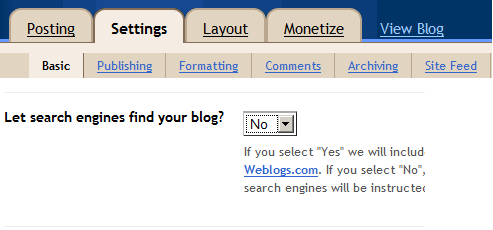
Create Blogger blog and restrict search engines

Create your Blogger blog and Restrict the Search bots

This will instruct the search engines not to crawl your newly created blogger blog. We will override the settings once we are done with the migration process. This is done to avoid getting penalized for duplicate content.

2. Log in to your WordPress blog and go to Tools >Export. Next, download the export file which will contain all the posts and comments of your blog.
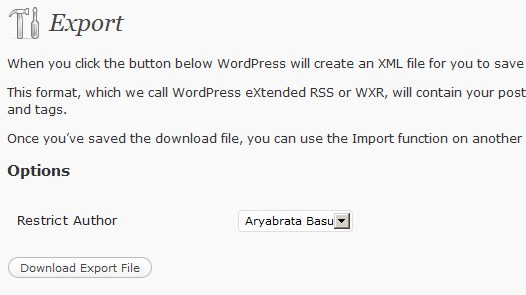
Download WordPress posts Export file

Download the posts export file

Unfortunately, the export file which you will download is not compatible with Blogger Import function, and you may get 502 Internal errors while trying to import posts.

3. To make the export file compatible, go to WordPress to Blogger conversion utility and convert the export file to Blogger compatible format.

Convert WordPress Export file to Blogger Compatible format

4. Login to Blogger dashboard and import the export file which you converted in the earlier step. This would import all the posts and comments of your WordPress blog in blogger.

Now you have two copies of your blog hosted on the web. One is with WordPress and the other is with Blogger. There is no fear of duplicate penalties as we have restricted the search bots from crawling your blogger blog in the first place (refer step 1).

Step 2: Backing Up the Images From Web Server and Restoring them in the Blogger Blog

The blogger blog now contains all the posts and comments from your WordPress blog. But the images are still pulled from your Web server, because the imported posts still contains the same location for images which are hosted with WordPress. When the platform migration is over, and you delete the files of your WordPress blog, all the images in your blogger blog would be broken.

Transfer Images from WordPress to Blogger blog

Backup and Transfer all those images and media files

To solve this, open your FTP account and download all the images used in your WordPress blog. Instead of manually downloading images from all the posts and pages, it would be better if you download the entire image upload folder ( wp-content/uploads by default ).

When the image backup is ready, login to your Blogger blog and update all the posts with the new set of images. You will have to edit each and every single post and reupload the images on Blogger server. This process will take some time, which depends on how many posts you have written in your WordPress blog.

Step 3: Tell Humans and The Search Engines That You Have moved to a New Address

Now that you have imported all the posts and images, it’s time to tell the search engines that you have moved your blog to a new location. This is the most important and crucial step as you would want to retain the traffic, pagerank and all the search juice from your old blog to the new one.

The idea is simple. You will have to place a 301 redirect on every page of your WordPress blog and point the redirect to the corresponding page of your Blogger blog.

1. Download WordPress redirection plugin and activate the plugin in your self hosted WordPress blog.

2. Go to the plugin options and add 301 redirects to one of your post. To add a 301 redirect, first copy the URL of the original post in your WordPress blog and paste the URL in the Source field.
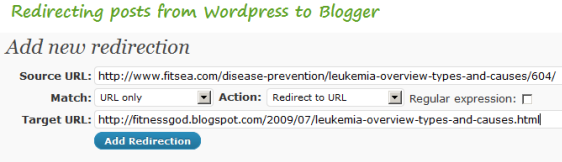
301 redirect posts fromwordpress to blogger

301 Redirect posts from WordPress to Blogger site

Next, copy the corresponding URL of the page in your blogger blog and paste it in the Target URL field. Then click ” Add redirection” to complete the redirection process for that post.

Note: There is no autonomous process which you can use because the two URL structures are totally different.

3. Open that post from your browser and it should automatically redirect to the corresponding blogspot post.  Congrats, you have successfully redirected one of your posts from WordPress to Blogger.

4. In the same way, redirect all the pages and posts one by one within WordPress administration area. In the end, you will see a giant list of redirection rules in the Redirection plugin options. Do not forget to redirect the homepage as well.

Redirect WordPress posts to Blogger blog

Place 301 redirects on every post and page in WordPress blog

5. Remember you have blocked the search engines from crawling your blogger blog in step1. This was done to prevent duplicate content penalties since the same content would be accessible from both the blogs. Since you have redirected all the posts to the newer location, it’s time to invite the search engines to crawl and index your blogger blog.

Login to your Blogger blog, go to Settings and choose “Yes” for “let search engine find my blog?”.

Tell search engines to crawl your blogger blog

6. The feedburner feed, which points towards www.yoursite.com/feed/ needs to be updated too. Login to feedburner, select the feed and update the address with the feed address of the blogger blog. (also read: how to customize WordPress category feeds with Feedburner)
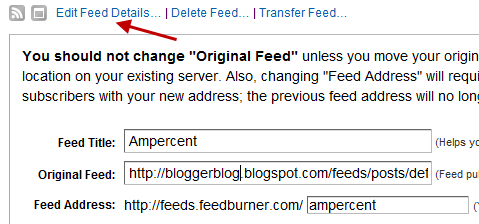
replace feed address with blogger feed in feedburner

Update the feedburner feed address

8. Log in to Google webmaster central account and add both the blogs – your old WordPress blog as well as your new blogspot blog. Verify both of them using an XML sitemap file.

9. Wait for some days, till Google crawls your blogger blog (assuming your WordPress blog is already indexed). After a few weeks, when the search bots are finished indexing your posts at the blogger blog, you will see the change reflected in the SERP snippets as shown below

posts at the blogger blog are in google's index

Now set up a new Google Analytics account for the blogger blog and start tracking the daily traffic trends. Overtime, you will see the traffic coming in and this will level with the traffic you used to get in your earlier blog, powered by WordPress.

10. Once the blogger blog is crawled and indexed, login to Google webmaster tools and select your earlier blog, which runs on self hosted WordPress. Under “Site configuration” choose “Change of address” and submit the address of your blogger blog.
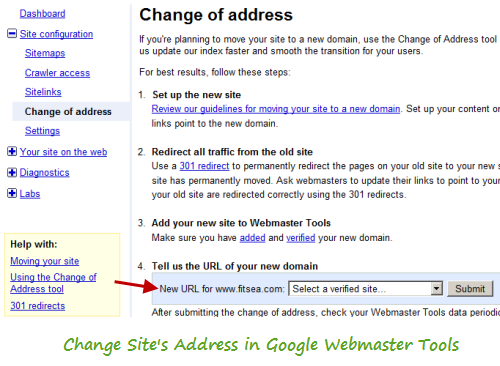
Change Site Address in Google Webmaster Tools

Change Site Address in Google Webmaster Tools

That’s it. You have just migrated your WordPress blog to Blogspot without losing any posts, comments and most importantly all the search traffic and linkbacks are retained. Any link pointing to the older blog will automatically be redirected to the corresponding page of the blogger blog. Thus your pagerank is most likely to be retained.

This is what my friend Abhishek has to say after his blog was migrated from WordPress to Blogger:

The transfer of my self hosted WordPress blog to blogspot completed in 3 weeks. My pagerank has retained and the traffic hasn’t changed much. Thanks to Amit!

Do let us know your thoughts and ideas through a comment.

ADVERTISEMENTS

You may also like to read:

  • http://www.techylabs.com Rishabh Agarwal

    Awesome tutorial man! In-depth and so simple. How about the same thing reversed? I mean an in-depth tutorial for migrating WP to Blogger platform? Would be a great help

  • http://www.ampercent.com Amit Banerjee

    @Rishabh: Thanks for the comment. Regarding Blogger to WordPress transfers, there are already some popular guides available. Although, I will write about it shortly.

  • http://piseth.info Piseth

    This is great help. I was looking for this tutorial for few months now I found it. Thank you.

  • http://www.ampercent.com Amit Banerjee

    Thanks Piseth for the comment.

  • http://www.turbotrafficsystembonus.org Eric

    Tis great advice, thank you

  • http://www.strictlyonlinebiz.com/blog Udegbunam Chukwudi

    Wonderful tutorial as always but with the setback that it’s quite tedious when you have to reupload images for over 200 blog posts and create redirects for them as well. Hopefully in the future, Blogger will implement a way of achieving this just like WordPress has already done.

    Another tip, I think will most definitely work is after Google has taken note of the redirects on your blog posts, registered your new blogspot blog in the search results and removed references to your previous domain name, you can now turn around and use that same domain name for your Blogger blog making it look professional ;-). You’d probably have to wait like 2-3 months to execute this change to avoid losing page rank.

    I hope you understand what I mean. Cheers

  • http://www.ampercent.com Amit Banerjee

    @Udegbunam: Yes I understand what you mean by using the same domain name in blogger. But do that only after the traffichas levelled and Google has crawled all the pages of your blogger blog. Thanks for the comment.

  • Dikdik

    i will must try this tutorial, thx

  • http://www.photonicslab.org Keira James

    i host 5 of my blogs on Blogspot and it is really good for beginners. but if you want something with more features, nothing beats wordpress`~”

  • http://www.ampercent.com Amit Banerjee

    @Keira: Yes, WordPress is still the best blogging platform, but if you need to transfer – this tutorial will be useful

  • http://fitnessgod.blogspot.com Abhishek

    Really thankful man for that migration..That was really fast and perfect…Highly recommended for all who want to do the same…

  • http://www.ampercent.com Amit Banerjee

    Thanks Abhishek.

  • http://www.prrank.net teylor

    Thank you You are very sweet to take the extra time to respond.

  • http://www.softtricks.com Abhishek

    Nice tip. I am going to implement it.

  • http://www.ampercent.com Amit Banerjee

    Thank You Abhishek. btw, are you planing to move your blog to blogger ?

  • http://ipangsan.web.id ipangsan

    nice inpoh gan..
    i`ll try with u`r way
    thx

  • http://beben-koben.blogspot.com Beben

    wejejejejeje…its a cool
    great my friend…;)

  • http://www.techzene.com Krishna

    Thanks a lot Amit. I was trying for this solution from many days as i am planning to shift one of my blog which doesn’t require wordpress feautures to blogger.com. Thnk u once again.

  • http://www.subcorpus.net subcorpus

    move complete !!!
    goodbye wordpress …
    hello blogger …
    lets see how this goes … :)

  • http://www.ampercent.com Amit Banerjee

    @subcorpus: Best of luck!, let me know if you face any problems

  • http://www.cmsfitnesscourses.co.uk fitness trainer courses

    I want to keep my self fit. I hope your website will be helpful for me in this object. Your close cooperation will remain forever. I shall be very thankful to you.

  • http://aroomofmamasown.com Mary (MPJ)

    I’m in the midst of this right now. Very helpful post. One question: do you know how search engines crawl the site (and how it might affect page rank) if I use the pass-through feature instead of 301 redirect?

    I wanted to keep the appearance of the URL the same, and if I do a straight 301 redirect, I get blogspot.com rather than my custom .com domain name. The pass-through feature maintains the look of the domain name, but I am not sure whether to let search engines crawl the Blogger blog if I go this route. Any suggestions?

  • http://www.ampercent.com Amit Banerjee

    @Mary: Search engines crawl a site through links and if the incoming links to your blog remain intact, your pagerank is not going to be affected. You have to first choose the domain settings from blogger.com to show your site’s main address and not xyz.blogspot.com. Then loginto WordPress and performa a 301 redirect to the corresponding blogger posts and pages. This is going to be tedious but unfortunately, there is no workaround.

  • http://thuruinhttp.wordpress.com Thurupathan

    Really this is very helpful. I have bees searching this kind of a post for long time.

  • http://www.ampercent.com Amit Banerjee

    @Thurupathan: Thanks, I am glad it was useful.

  • pat

    I’ve tried. There was an errors. How to fix it?

  • http://www.ampercent.com Amit Banerjee

    @pat: What kind of errors you got ?

  • http://www.theitechblog.com Namit Gupta

    The WordPress blog should be up and running in order for the redirection to take place. After how many days of successful transfer from WordPress to blogspot, one can shutdown his WordPress blog?

  • http://www.ampercent.com Amit Banerjee

    @namit: Thanks for asking the question.

    When the search engines have completely crawled and indexed your Blogger blog. You can turn off the WordPress one. The redirection is a way to tell the search engines that you have moved the URL to another location.

  • Tissue Culture

    i always syndicate feeds on my subcribers and of course feedburner is definitely a great help ‘~-

  • http://www.wacky5.com dr vikram

    Thank you dear, this post has really helped me a lot, extremely thankful to you, i was fed up with again and again new versions of wordpress and my blog was expoilted by some mysql injection. Thanks a lot, now i need not to worry about maintenance, and hosting. Lastly I will say Google is the best.

  • GS

    I have been trying to move my old WordPress posts to my new blogger for a year now, but my export file is over 1MB. Do you have a suggestion for how to proceed when I can’t use the conversion site? Or is there a way to break up the file in half in order to use the conversion twice?

    Thanks so much for your help!

  • http://fitnessgod.blogspot.com Abhishek

    I must thank Amit for this great help. He has done the migration successfully and now I am getting good traffic for my blog http://fitnessgod.blogspot.com. Highly recommended from me.

  • https://yourspj.wordpress.com Pratik

    Nice post. Friend help me solving my problem. I have a wordpress.com blog. I want to make money with my blog. Is there any way to make money in this condition?

    If I have to trnsfer my blog, what should I do? Here you explained the migration of SELF HOSTED wordpress blog to Blogger blog

  • http://www.ampercent.com Amit Banerjee

    @Pratik: Sorry but WordPress.com does not allow third party ads on their sites. If you want to monetize your blog or content, I would suggest migrating the blog to a self hosted WordPress platform which requires a hosting account for storing the files, creating a Database and so on. If you don’t want to use a hosting account, you have to migrate your WordPress.com to Blogger.com, because they allow third party advertisements and codes. Thanks for your comment.

  • http://www.strictlyonlinebiz.com/blog Udegbunam Chukwudi

    By any chance do you have a working blogspot to wordpress tutorial?

  • Lunedi

    A very in-depth tutorial, thank you. I’m actually a longtime Blogger user and have just moved to WordPress, but I’m thinking of keeping my Blogger and moving back to it when my hosting expires in a year. It’s true that Blogger virtually has no downtime and is very easy to maintain.

    Now if they have the option to password protect each post, I shall be really happy.

  • http://www.nearbyexpress.com Fashion

    Great help! Really! Thanks.

  • http://nfljerseygear.com Steelers jersey

    I can imagine I read it twice. Though I’m not as versatile on this subject, I agree with your closings because they make sense. Thanks and goodluck to you.

  • http://www.lvbags-uk.com lv bags uk

    The above code I have changed my teaser-box and teaser width as same. You should replace with your content width. And if you want you can change your font size inside the teaser.

  • Pingback: brightbird.info

  • Pingback: Photovoltaik l Heiszsysteme l Solaranlagen l Sanierung Heizung l Solarenergie

  • Pingback: compass test prep

  • Pingback: LSAT test prep

  • Pingback: Search for property in Turkey

  • Pingback: official website

  • Pingback: Ons Kookboek is en blijft dé kookbijbel van Vlaanderen ! Standaard Boekhandel 2013 , Lekker koken en genieten van makkelijke en heerlijke keukenrecepten uit 3.000 kookboeken plus originele, gezonde recepten uit ons eigen online kookboek.

  • Pingback: blackjack

  • Pingback: cacodemonomania albumenize abstemiously

  • Pingback: Plotso Bigmano

  • Pingback: Canada web design, Toronto web design, Web hosting

  • Pingback: Video About E Liquid

  • Pingback: personalized license plate frames

  • Pingback: Skies Miltonia Condo

  • Pingback: go here now

  • Pingback: blog hight tech

  • Pingback: Just Some Thoughts on My Site

  • Pingback: home distilleries

  • Pingback: All about personal finance success

  • Pingback: Denver Seo Consultants

  • Pingback: fire rated doors

  • Pingback: tattoo ideas

  • Pingback: read more

  • Pingback: da vinci robot lawsuits

  • Pingback: united states

  • Pingback: view site...

  • Pingback: игра престолов скачать

  • Pingback: macklemore same love

  • Pingback: Diet pill

  • Pingback: brosch?ren

  • Pingback: zasłonka prysznicowa

  • Pingback: brosch?re

  • Pingback: Private School Loan Consolidatio

  • Pingback: Gift Basket Business

  • Pingback: Read This

  • Pingback: weight loss motivation

  • Pingback: cardiovascular surgeon

  • Pingback: ecommerce web design

  • Pingback: visit official website

  • Pingback: paintless dent removal school and classes

  • Pingback: more

  • Pingback: click here

  • Pingback: click here

  • Pingback: click here

  • Pingback: click here

  • Pingback: click here

  • Pingback: click here

  • Pingback: click here

  • Pingback: click here

  • Pingback: click here

  • Pingback: click here

  • Pingback: click here

  • Pingback: click here

  • Pingback: click here

  • Pingback: click here

  • Pingback: click here

  • Pingback: click here

  • Pingback: click here

  • Pingback: pc speakers review

  • Pingback: 移民

  • Pingback: single women

  • Pingback: best peals

  • Pingback: Ketone Balance Duo Reviews

  • Pingback: Click this link

  • Pingback: this content

  • Pingback: Mumbai Pune Cabs