Windows live writer is the most favorite blog editor among bloggers. If you love using Windows live writer why not use some really useful windows live writer plugins and boost your blogging experience.
Category: General
-
Twitter Tools that Save Your Time – Get Productive on Twitter
I have been using Twitter for quite some time now and now i have realized that it actually makes me less productive. Sometimes hours are wasted reading to each and every tweet, searching etc. However Twitter turns out to be an addiction and you cannot neglect it in any way.
So how do we keep a balance between Twitter and stay productive at the same time. Here are some of the methods that will save your time while you are on twitter :
Twitter for Busy people
Visit Twitter for Busy People and enter your twitter username. You will see a list of maximum 500 people you are following. Hover over a profile and you can see the latest Tweet of that person(See example).
You can even see an entire conversation thread. The site also offers a bookmarklet so that you can easily check the latest updates from your Browser.
Its interesting to see the tweets being categorized into “Tweets in the last hour” and “Tweets in the last day” so you can quickly absorb the tweets and carry on.
Do not ignore Followers with Less updates
When we are busy, we can’t really afford to be active on Twitter all the time. That means you miss out the updates of your less active friends.
To solve this issue visit Twitter100 to see the most recent updates of a maximum of 100 of your followers. Hence, you don’t miss out those followers who tweet less. The page will auto refresh in every 3 minutes.
Clicking a profile takes you to the follower page where you get to see the tweets of that profile with the same concept.
Use Tweet deck and sort Followers in groups
There must be a wide number of people whom you follow on Twitter. Some are your friends, some may be bloggers, some may be web services and some may be “A Listers”. So it makes sense to group similar people together on Tweetdeck and read the tweets in batches. Saves a lot of time and also helps in choosing what to read and what to skip.
Use a Fake account to Consume Tweets
If you are using twitter to Consume tweets and gather information, it may be a good idea to create a dummy account and follow everyone there.
At the end of the day you can just scan the tweets in that Twitter account and consume the content. Use your personal account to connect and network with friends and use a dummy account to consume information. This method has Saved Me hours. (Tip: best sites to share music on Twitter)
Post your Blog Updates automatically
You can use TwitterFeed to show your blog updates or updates from an RSS feed automatically as tweets. Saves a lot of time and if you are offline – it takes care that your blog updates are shown in your twitter account. If you use Windows live writer, then it might be a good idea to ping Twitter from Windows Live writer )
Get your tweets as an RSS feed
You can create ego surfing Feeds on twitter and get the rss feeds of your tweets in your RSS reader. So at the end of the day you open your rss reader and if there is any mention, you get them as Feeds.
See recommendations with Mr. tweet
If you want to see recommendations of whom should you follow try Mr. Tweet. Based upon your tweets, Mr. Tweet recommends you the people you should follow. It also shows you a list of people who are following you but you aren’t following them.
Schedule a Future tweet with TweetLater:
TweetLater allows you to schedule tweets at a later time, send welcome and direct messages and auto follow those who follow you.You can also track keywords with TweetLater. But basically I use this one when i have a future update to be delivered and i am away from the computer. A similar service is Twittertise.com.
Tip: How to schedule emails at a future date
Social too- Automatic Twitter Tool
One of the Best automatic tools for twitter. Once you sign up and complete the procedure you can configure Social too to – Follow those who follow you , unfollow those who unfollow you and send an automated direct message to your followers. You can also get daily email messages about who followed or unfollowed you.Just set it up and forget the issue.
Use twitter from Email
If you are a gmail user and prefer doing stuff from email then you should integrate Twitter into your Gmail account. This helps you check your twitter updates and tweet within Gmail without requiring another desktop application to manage the Tweets.
Integrating twitter into your Gmail requires an Add-on to be installed. A simpler procedure might be using TwitterMail. Just sign up for an account to get your Twittermail email address.Save this address in your contact list and whenever you send an email to TwitterMail the message appears as a tweet in your twitter account.The added benefits are Sending photos and posting future updates. But I would still prefer using the Gmail Gadget instead.
Tweet From Feeddemon
If you use Feeddemon to read RSS feeds from Windows, why not tweet from Feeddemon, read and reply to tweets and manage your twitter account.
So instead Of checking all your tweets every now and then,process them in batches and you will end up saving more time.
What Web services or tools do you use to save time on Twitter ?
-
WordPress Post Slugs : How to improve your Article URLS ?
Apart from the title of a page, content quality, links and social signals, the URL of a page plays an important role in the search engine optimization of a webpage. Whether you have a business website or a blog, you should choose meaningful URL’s for the pages of your site. The words used in a URL should be chosen carefully because search engines and other search spiders use these words to understand what a specific webpage is all about.
WordPress has a very useful post slug feature which can be used to define meaningful Url’s of a blog post or page.
What is the post Slug ?
The post Slug determines what would be the URL of your Blog Post when you publish it. The post slufg is located just below the title of your post and If your site’s Permalink structure is a Friendly One then You should take utmost care while writing the post slugs.

If you publish a post In WordPress without bothering about the post slug, WordPress will automatically generate a URL of your article that is equal to your article title. In that case the generated URL may not be search engine friendly.
An example of post slug : Consider an article titled “ How to Use Google groups to back up your emails from Gmail “. If you are not using the post Slug feature then your Generated URL would be :
/how-to-use-google-groups-to-back-up-your-emails-from-gmailThe above generated URL has 3 serious drawbacks :
1.It’s lengthy and without any purpose
2.Contains unnecessary words
3.Bad when used as anchor texts as links In other web locations or emails etc.
So it becomes quite necessary to write better post slugs for your blog posts. Here i have listed some good as well as some bad practices regarding post slugs in WordPress.
5 Good Practices For Writing Post Slugs In WordPress
Here are some of the tips on writing better post slugs in wordpress :
1. Avoid stop words in post slugs. Stop Words are commonly used words like “a” “to” “the” etc.These words add no value in your URL’s from the SEO perspective. So in our above example a good post slug without any stop words would be “/back-up-gmail-google-groups
2. Focus on primary keywords: When writing your post slug, always focus on your primary keywords.( In this example our primary keyword is gmail and backup.). So it becomes imperative to list them earlier than other keywords.
3.Think of the words users will type in search engines : Use keywords common people use in Search engines to find your content. So a User is most likely to search for “back up gmail” than “google groups method to back up gmail” . You can use Google Adword keyword tool and Google related searches feature to find keyword ideas for your content but my advise is not to exaggerate too much on keywords alone. Just keep it siple
4.The fewer,the better : The fewer keywords you use, the higher is their relative value. Do not let unnecessary keywords dilute the value of important ones.
Suppose Google Search algorithm uses a score of 10 for the URL of an article. If you use 4 keywords then every word is assigned a score of 2.5 while if you use only 2 words, each word has a keyword score of 5.
5. Short URLS serve as better anchor texts : Shorter URL’s are preferable when your article is placed on forums or other blog posts . It looks neat, easier to type and refer.
6. Post Slugs may not be Equal to Post Titles: There is no hard and fast rule that a post slug or URL must be equal to the post title
Before you Hit the Publish Button
As soon as you hit the publish button, some actions are performed and you can’t stop them. For example :
1.Your Blog post is added to your feeds. If you modify the post slug after publishing your post, it will break the original URL. Anyone reading the feed from a feed reader and clicking the Link will arrive at a 404 page on your site
2.Pings are generated the Moment your post is published.Some Ping services will Visit your Blog almost Instantly while some may take some time (24-48 hours). Modifying the Post Slug after Publishing is thus to be avoided,
3.Do not start modifying your old post slugs and try to optimize them now. They are already Indexed with the search engines.So if you change the post slug and Your Post appear in Search results guess what will happen ? The users Won’t be able to Find the content as you have changed the post Slug. It would be a Dead link.
4. As soon as you Publish a Post Your Trackback System starts working.It tries to send Trackbacks to posts Linked from your Blog Posts.Chances are that Your link Will appear in their trackbacks section or Comments panel.So if you Change the post slug after publishing all those Links Will be Dead Links.
Earlier I would Finish My post and Won’t pay any attention at all with the Post Slugs.It was generated automatically and I was happy enough for that.That was a Mistake.I hope you aren’t committing the same Mistake as I did.
Is there any Sort of warning that I can Use ?
Yes of course.Try this Greasemonkey script For Firefox that warns you if you haven’t manually set up a Post slug before Publishing.So Before you Hit the publish Button always Change and optimize your Post slugs for Search engine optimization. Do you Use your Post Slugs Efficiently ?
-
Create pie charts online with Free tools
Anybody using Microsoft office can create bar graphs using Excel 2007.But what about pie charts ? There are so many useful websites that let you create pie charts online for free.You do not need any software and it’s so easy that even your mom can get the job done in minutes
-
WordPress permalinks FAQ : Your Guide to choosing the right Permalink Structure
Time and again many people have asked me the same Question over email and i thought why Not write a Blog entry clearly describing about the best permalink Structure In wordpress.
-
7 ways to Open Microsoft Excel Spreadsheets Without Excel Software
There may be a situation when you have an Excel spreadsheet to be viewed but the Computer you are using do not contain any Office application like Microsoft Office or Open Office. Here are a few ways To Open Excel Spreadsheets without Microsoft Office or OpenOffice.
-
5 Free tools to Recover Hard Drive Space on Windows
Overtime your hard drive will be occupied by Junk files that you do not need anyway. This may include huge torrents, Music,videos spread all over your system.Here are some free windows tools that lets you scan your hard drive for junk files and free hard drive space.
-
Create an XML Sitemap for WordPress , Blogger and Static Websites
XML sitemaps are particularly useful when you want to inform the search engines about when your site has new content and when should the bots visit your site for Newer and Undiscovered pages. Learn how you can create a Sitemap for blogger, WordPress or Static websites.
Before you read on here are some Frequently asked questions about XML Sitemaps
What is an XML sitemap ? What Purpose does it Solves ?
An Xml Sitemap is used by Webmasters and Bloggers to inform the search engines about pages in their site that are available for crawling. An Xml sitemap lists the URL’s of a site and the metadata of the URLs so that search bots can easily Crawl and Index the content.( See example of an XML Sitemap)
A sitemap file is placed usually on the root directory of the blog.
When is the Sitemap .XML file Useful ?
Sitemaps are useful when :
– Your site is new and your pages haven’t been discovered by the search bots.
– Your pages do not have external links pointing to them
– Your pages have dynamic content
– Your Site has a huge number of pages that aren’t well interlinked
Is Sitemaps Essential For Crawling ? Can My Blog Be Crawled without a Sitemap ?
Yes your blog can certainly be crawled if you don’t have an XML sitemap.Search bots crawl web pages using external links. If you have some external links pointing to site or blog your pages will be crawled . AN XML sitemap makes the work of Search bots easier to discover your content and is not Compulsory for getting crawled and indexed.
Create XML sitemap for WordPress Blogs
Creating an XML sitemap for WordPress Blogs is fairly simple. Just Download The Google Sitemap generator plugin and Upload it to your WP-content/Plugins Directory. after that activate the plugin from Your WordPress administration area.
As soon as The Plugin is activated and you post new content your Sitemap.xml File is created In The root directory of Your blog. So if Your Blog is Hosted at “www.domain.com” your XML sitemap can be found at “www.domain.com/sitemap.xml”
Create XML sitemaps for Blogger

To create an XML sitemap for Blogger follow the steps below :
1.Log in to Google webmaster tools with your google account and add your Blogger Blog.
2.Verify your Blog by adding the Suitable meta description generated during the verification process.The meta tag is to be added before the </head> section of your blog template.
3.After your site has been verified click “Add a Sitemap “ in Google webmaster tools.Add your Blog’s Atom feed Link in the Add a Sitemap page. The atom feed format is http://yourblogurl/atom.xml?orderby=updated
Wait for some hours for Google to examine your sitemap file and you will see the Sitemap Status as OK
Note : The atom.xml contains only 25 posts by default and If you want to increase the Number of URL’s change the URL to atom.xml?redirect=false&start-index=1&max-results=100.
If you have several number of posts (probably hundreds, if not thousands) then you have to add multiple sitemaps for your blogger blog. So add :
http://yourblogurl/atom.xml?redirect=false&start-index=1&max-results=100 ( as one sitemap )
http://atom.xml?redirect=false&start-index=101&max-results=200 ( as the 2nd sitemap ) and so on….
Create an XML Sitemap for Static Websites
If you have a Static website a wonderful sitemap tool is available at AuditmyPC. Just add your blog home page URL and click the Play Button. The Sitemap tool starts gathering all the URL’s present in your website and lists then in the order of date when they were published. It will take some time if you have a fairly large blog or website.

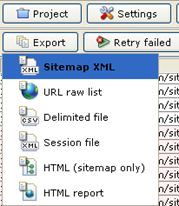
After the gathering of URL’s is complete you can export the list as an XML sitemap or an HTML sitemap and save it to your computer. Next upload the XML sitemap to the root directory of your website and presto ! you have your XML sitemap up and running. Now you can add this sitemap URL in Google webmaster tools or any other webmaster accounts.
Please note that This sitemap tool can also be used to create sitemap for WordPress,Blogger ,Typepad or Tumblr blogs. Here is a detailed list of sitemap Creation tools.
-
Learn to generate new post ideas when you don’t have one
We write a lot & more importantly our readers read a lot. They are always looking for something fresh, something meaningful. Even big bloggers of our times find it hard sometimes to carry on writing. They also fall short of ideas to write about. But we can’t stop writing, because there are millions waiting to read. So how to find good topics while we are stuck at a point. Let us find out how the big bosses of blogging generate post ideas.
-
9 Things to do “ When there is Nothing to Blog About “
Every Blogger has to face this Sometime in their career. You run Out of ideas and the words don’t just come out. What do you do when you run out of ideas for your blog posts ?
-
List of Video to Audio Converter Tools and Services
I came up with this post while figuring out a problem of mine. I had to download some mp3 files of some songs. I tried to do the search the web with as many as 25 keyword combinations. But none showed the proper search results to help me download the audio files. I went to all mp3 listing sites I could figure out. But they also failed. Then I visited the well-known YouTube & found a video for that song. I downloaded it but I needed the audio extracted from it. And I needed a video to audio converter tool or service. So here are the following ways that proved useful while converting video files to audio files.
-
Basic On-page SEO Best Practices for new WordPress Blogs
 Well there is always a start for anyone. Be it a first day at your job or be it a first date. The rule also applies for blogging too. So if you are new blogger, welcome to this world of mystery & get drenched in the endless rain of resources, created & showered 24X7. Well as a starter we all possess a fresh desire for achieving success. Now if you are starting off reading great blogs on your niche, you must have come across the key-factors for a successful blog. Good Content being the primary target others are niche building, SEO(search engine optimization), social bookmarking…blah blah blah. I won’t start. Well I will rather help you out on how to learn SEO for your blog.
(more…) -
Link Multiple Gmail accounts and check email at One place
If you have Multiple email addresses to check then managing emails can be really tiring. Every now and then you need to check all your email accounts for new mail. Here is How You can connect all Your Gmail accounts and check all your emails at one place. (more…)
-
9 ways to Search Multiple Search Engines together
The Internet is loaded With tons of information and searching May need some tricks to find the right Blog or page.Learn how you can Simplify your Search Experience with Meta Search Engines and Aggregators.
-
Avoid Email Spam Using temporary Disposable Email Addresses
Email spam is the Most Common and Disturbing Element of Internet. Both Geeks and the average user get a lot of Email Spam.You can avoid Spam email messages by Using temporary Disposable Email addresses.