
How to clear DNS cache on Android phone? If you are asking the same question, here is the ultimate answer. Many people often need to flush DNS cache on Android phone to check something. For instance, you are an admin of your website, and you have moved from one server to another server. Therefore, right
Read more
What is the best data recovery software for Windows 10/8/7? Many people ask this question but do not get a proper answer since not all the available software comes with a full data recovery feature list. However, here is a simple tool called MiniTool Power Data Recovery that allows users to recover lost or deleted
Read more
If you are not able to rename a file and getting ownership issue, maybe that file is being protected by TustedInstaller. Learn how to delete or rename TrustedInstaller protected files and get ownership to make any kind of change. Whenever you get an error message like You need permission to perform this action. You require
Read more
Although advertisement is one of the primary income sources of many websites and YouTube channel owners, some people use advertisements to annoy visitors. Knowingly or unknowingly, website owners often damage the user experience. If you are one of the people, who do not love advertisements on any website, here are some browsers those will block
Read more
If you have been reading a book continuously for a long time, apparently that is not good for your eyes. Or, let’s assume that you want to get an app that can read text message or books on Google Play Books app. All those things can be possible with the help of these text reader
Read more
How to lock WhatsApp on Android or iOS? Many people suffer from various problems due to WhatsApp’s messages. However, to solve this problem, you can head over to this article that will let you lock WhatsApp on Android and iOS within moments. WhatsApp is probably the most used cross-platform mobile messaging service out there, which
Read more
Although few features of Windows 10 have been narrowed down yet, you can find few things easier than earlier. Windows 10 allows users to add different types of account. For example, there are a guest account, standard account as well as an administrator account. Obviously, each of them has a different kind of features. In
Read more
If you are here to come across the issue Windows 10 failed to install due to error code 80240020, don’t take panic because you are not alone who faced the problem. There is a huge number of people reported on Microsoft community to fix this issue. If you see this error code 80240020 during the
Read more
Windows 10 stuck at BIOS screen – this is one of the worst problems that Windows users often face. It can happen anytime with any computer. It doesn’t matter what you do with your computer; you should definitely solve such problems. It creates too many problems when you work on the computer or to make any
Read more
How to use Spotify in India or how do I download Spotify in India? – These are the most common questions among music lovers who belong to India. There are thousands of people, who do not store music on their mobile or computer. Instead, they listen to music via online music streaming websites or apps
Read more
Are you getting slow computer due to a high rate of disk usage? This tutorial is the solution of 100% Disk usage issue on Windows 10 without using any third-party software. You can find the disk utilization rate in Task Manager in every Windows machine including Windows 10. This rate defines how much of your
Read more
Windows is a very useful and easy to use the operating system. On the other hand, the same OS is very sensitive regarding security. Although, Windows comes with built-in antivirus, yet, you should always use a third party security shield to protect your computer. There were several instances when users failed to protect their PC.
Read more
The “F” key is representing as the function key on a computer or terminal keyboard. It mainly programmed for operating system command interpreter in the form of sorting key. Every keyboard as a group of this function key started with F1 and ended with F12 – 12 function keys. This function keys sometimes work alone.
Read more
Do you know how to find saved WiFi password on Android mobile? No? Here is the solution. Nowadays, we cannot live without the Internet. Sometimes it is very tough to recharge your phone to get an Internet connection. So, all the time we are connected to a Wi-Fi network to do all the required stuff
Read more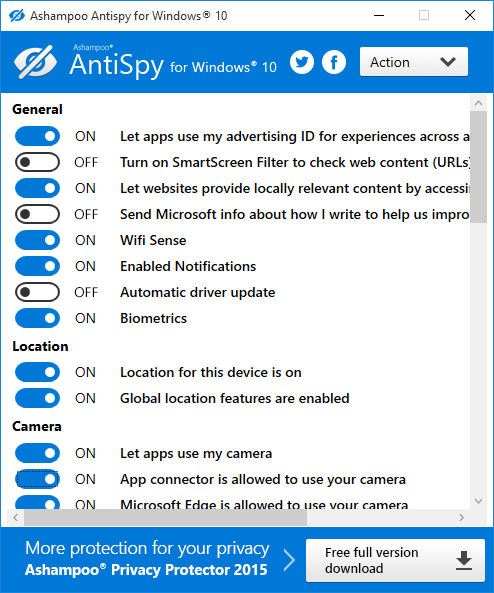
Ever since Microsoft launched Windows 10, many controversies are flying around regarding the security of Windows 10 PC users. There are tons of security loopholes especially for users related to digital privacy. Therefore, to help you fix Windows 10 privacy issues to secure PC, here are few tools that may assist you with this problem.
Read more