
Motorola has revamped their entire marketing strategy with some mobiles such as Moto E, Moto G and Moto X. among these three mobiles, you can find Moto G 1st Generation and 2nd Generation. On the other hand, they have also launched Moto X 1st Generation as well as 2nd Generation. Obviously, the 2nd prototype is
Read more
Installing a software on Windows or MAC is not a big deal. Everyone can do it easily. But, this trick is a bit different as today I am going to show you how to install and run software from cloud storage. There are generally two types of software. One type of software requires installation and
Read more
We all know that Windows is a popular operating system that is being used by billions of people across the world. Whenever you download any software, you can find an .exe file. All Windows software has an executable file or an installer. This installer helps us to install the software on the PC. After installing,
Read more
In earlier days, 500mb space was more than enough. But, now, many of the recently launched mobiles have more than 1GB of RAM and 32GB of memory. This phenomenon has become pretty common. Although, there are many mobiles those have 8GB of internal memory or so without any SD card support but most of the
Read more
Apple Watch is probably the first gadget that has sphere view user interface. Different companies have launched different UI, but this one is very unprecedented and much fascinating as well as useful. Apple Watch is set to be launched for consumers in near future. However, you can also try Apple Watch right now. Anyway, if
Read more
Internet speed on your mobile not only depends on the Internet plan you use but also the way in which you handle your smartphone. An average Internet connection may seem pretty fast with the right tools, especially the browser you choose. Although Google Chrome has been dubbed as the fastest browser, many users report better
Read more
Photography is a type of art. There is a connection between photography and photo editing. You must have acquaintance of both two subjects to get an enhanced consequence. The more you can visualize, the better your photo will be. That means only a DSLR camera on your hand and Photoshop in your PC cannot do anything
Read more
There are just so many distractions on smartphones these days that people have forgotten the core reason they were developed in the first place – to make your life easy and productive. Yet there are more apps to play games, listen to music and chat with friends, even strangers! But also there are numerous apps
Read more
iOS 8 has been very good at camera with lot of extensions. This helps iOS 8 users to perform edits directly from the Photos app itself. There is no need of any external photo editing apps, if you are going for basic photo editing like applying filters, red eye corrections and more. But, if you
Read more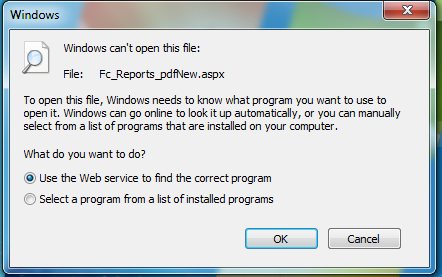
ASPX is a rare file-extension that we usually open in Windows desktop. ASPX is the source file of ASP.NET, and it is an internet media type text/HTML document, which was introduced and developed by Microsoft. ASPX is not an image file. It is an extension for active server pages. One day, one of my friends emailed me
Read more
By default, iOS doesn’t provide much options to customize the device from the ground level. Obviously, you can change wallpaper and do some other tweaks on your new iOS device, but they look boring after few days if you want a fully customized iDevice. Today I am going to introduce three Cydia tweaks those will
Read more
To be honest, iOS is not so popular among them, who want to customize their iDevice according to your wish. Apple has some restrictions to let users personalize their mobile. Obviously, this is possible to change Wallpaper of Homescreen, lock screen etc. but that doesn’t mean you can do anything with homescreen or lock screen.
Read more
Adobe is a popular software company, which mainly take care of graphics designing and some other things related to this. Adobe Lightroom is one of the most popular photo management program, which is available for Windows, MAC, iOS and now for Android too. YES! Adobe has launched their best photo processing software for Android users
Read more
iOS is indeed the most amazing platform for iDevices. iOS makes iDevices complete. Alike other platforms, iOS also comes with tons of free apps those are known as stock apps. Stock apps indicate inbuilt applications. However, today I am going to introduce some useful alternatives to stock apps for iOS to you so that you
Read more
Google, the web giant has gone one-step ahead and launched dedicated Classroom application for Android and iOS. You know that Google Apps for Education and Google Classroom has an interlinking. Google launched the Classroom back in May 2014 under Google Apps for Education. Google Classroom is such a great service that lets students and teachers
Read more