Automatically Share Google Plus Posts On Facebook Account
It has been one week since Google Plus was released on a field trials basis. But the sad thing about Google Plus is that there is no support for third party apps and API’, so users are unable to share Google Plus posts on Facebook and Twitter accounts.
If you have a Google Plus profile and you want to post updates from Google Plus to Facebook, you have to do it manually. Regardless of whether you share status messages, links or quotes on your Google Plus profile, you have to follow the classic copy paste convention so that your Facebook friends who haven’t joined Google Plus yet, can see your status updates posted in Google Plus.
Previously, we told you about a browser extension which can be used to share Google Plus posts on Facebook and Twitter. The extension works in Google Chrome but here is another seamless and automatic way to sync Google Plus updates to your Facebook account, without having to install any browser plugin or using any third party application at all.
Automatically Share Google Plus Updates On Facebook
Facebook has an interesting mobile updates feature similar to YouTube, Twitter and other social sites) which allows you to post updates to your Facebook account using a secret email address.
The idea here is that you will have to add your Facebook secret email address as a friend or contact in any of your Google Plus circle. Next, whenever you want to share a post from Google Plus to Facebook, simply add that email to the share box and it should work just as fine.
Here are the steps that needs to be done:
1. Go to Facebook mobile setup page, sign in with your Facebook account and you should see a unique email address at the bottom of the page.

2. This is your personalized upload email address which can be used to post status updates, upload photos and videos straight to your Facebook profile, without having to open Facebook.com. Keep this email address secret and don’t share it with anyone.
3. Open your Google Plus profile, go to the circles tab and add the Facebook secret email address as a contact to your Google Plus circles.

It would be better if you create a unique circle for this email address only and name it “Facebook”. That way, you don’t have to remember the email address and you can simply type in the name of the circle to cross post an update from Google Plus to Facebook. also read: import your Facebook friends on Google Plus
4. While composing an update on your Google Plus account, be sure to enter the name of the circle in the “Sharing options” field.
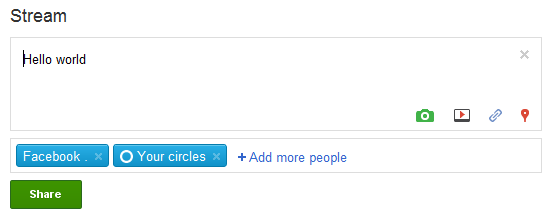
5. You can add multiple circles so remember that choosing only the “Facebook” circle won’t allow your Google Plus friends to see the update. To make sure all your Google plus friends as well as your Facebook friends see a specific post, remember to choose both the “Facebook” and “Your circles” option, as shown above.
6. All done!
It will take some time until the post appears on your Facebook wall. This is because Google Plus will send an email to your Facebook secret email address which needs to be authenticated first. I have tested this method and it works just as fine.
Please bear in mind that your post on Google Plus should be 50 characters or less, anything bigger and it will be automatically truncated by Facebook email upload system.
You can try the same method from your mobile too. Simply open your Google Plus account, and share the post with the Facebook circle, it will be automatically posted on your Facebook wall within a couple of minutes.
Here is one more Google Plus tip which we think you will enjoy: Get Google Plus notifications without opening Google Plus.
At the end of the day, it is really very difficult to manage so many social sites and keep your social timeline updated. I also recommend using selective tweets, another nifty Facebook app which lets you cross post updates from your Twitter account to your Facebook profile, automatically.
1. Go to Facebook mobile setup page, sign in with your Facebook account and you should see a unique email address at the bottom of the page.
how to get into this website since it was directly enter to the Facebook mobile but it press website.