How to Share Facebook Videos With People Not On Facebook
If you are trying to share Facebook videos without people not on Facebook, you should follow this tutorial. You can upload videos in your Facebook profile and share that video with your Facebook friends quite easily. But this is not the case when you want to share the same video with people outside of Facebook. It is because Facebook does not allow an “Outsider” to view your photo albums or videos.
Consider a scenario, you have some video clips on your computer, and you want to share them with your online friends. In that case, it would be better to choose YouTube or other video sharing sites because these sites let anyone view your uploaded video. The viewers do not necessarily have to create an account with the website to watch the video clipping.
Sharing videos from Facebook is problematic due to the following two reasons:
1. Facebook does not provide any embed code for your uploaded video. You can’t embed a Facebook video on your blog or website (legally).
2. Facebook does not provide a publicly accessible URL of a video.
How to Share Facebook Videos With People Not On Facebook
To share Facebook videos without people not on Facebook, follow these steps-
- Select a Facebook video that you want to share with your friend.
- Click on the video link that looks like this – https://www.facebook.com/username/videos/unique-id
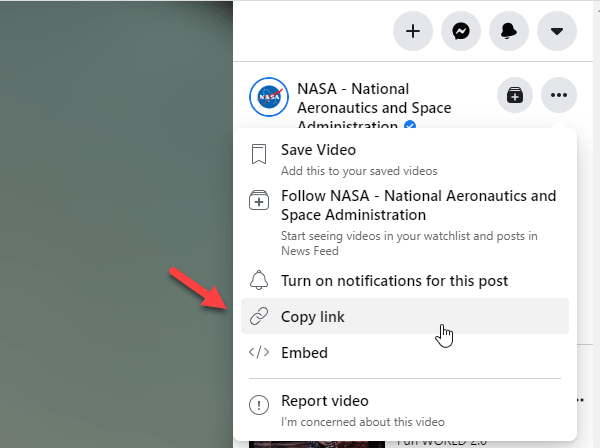
- Click on the three-dotted icon.
- Select the Copy link from the list.

- Send the link to someone to allow him/her to watch.
Embed Facebook Videos in a Webpage
If you embed a video on a webpage, anybody can watch that video without any problem. No matter whether someone has a Facebook account or not, you can allow that person to watch the video. Embedding a video on a webpage is quite easy, as Facebook allows users to get the respective code without any problem.
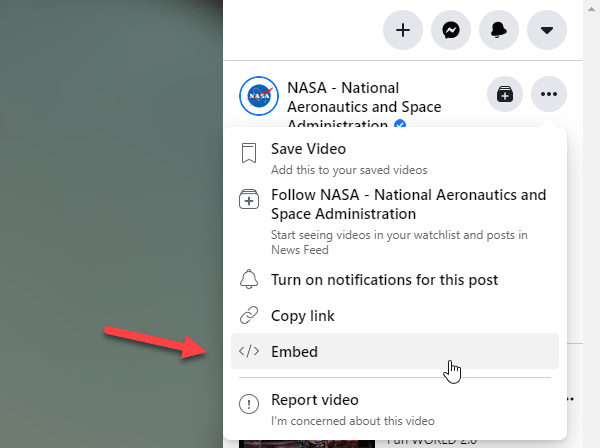
To get started, select a video and open the link to that video. After that, click on the three-dotted icon and select the Embed option.
After that, click on the Get Code button to generate the code and copy it. After that, you may go through the screen’s instructions to create an App ID. Follow that process; you should find two sets of codes. The first one needs to be placed inside the <body> tag, and the second one should be placed where you want to display the video player on a webpage.
After publishing the webpage, you can ask your friend to open it so that he/she can watch the video.
Download Videos From Facebook
If you want to download videos from Facebook quickly, try Facebook video downloader add-on for Firefox. This extension adds a “Download Video” link right next to all videos on Facebook. You can also use the “Convert Video” link to convert the video in preferred formats and then download it on your computer.

Do check out how to share Facebook photo albums with people not on Facebook.
If you do not like to use these methods, you should try some simple steps to share Facebook videos with people not on Facebook. These following methods are pretty simple and easy to use. The only drawback is you need to use a computer or official Facebook app for mobile.
Method #1: Copy Facebook Video URL
It is possible to share a Facebook video with anyone not on Facebook if you can copy the URL of the video. If the uploader has made the video public, you can certainly share the video with everyone, not on Facebook. You can send the video URL via email, text message, WhatsApp, etc. It is quite easy to copy the Facebook video URL, and there is no need to use any third-party tool for that. The following steps need to be followed on a computer to copy the Facebook video link.
At first, find a video you want to share. You need to hit the Play and Pause button one after one. After that, right-click on the video and select Show Video URL option.
You should find the URL in a box. Following that, you can select the whole URL and copy that in your notepad. Later on, you know what you need to do to share the URL with all the people not on Facebook.
The drawback of this method is the recipient needs to open Facebook to get the video. However, if you can download the video and send it on WhatsApp or anywhere else, the recipient doesn’t need to open Facebook. Instead, he/she can watch the video directly.
Method #2: Download Facebook Video
Several tools can help you download the video. No matter which tool you choose, you need to enter the video URL first.
1] FB Down

FB Down is a simple yet handy website to download any Facebook video. The video needs to have a Public tag. Otherwise, this tool cannot fetch the video from the webpage. This tool allows users to download a video in HD as well as SD. if you have a considerable amount of bandwidth, you can go with HD quality. Otherwise, the SD is for you.
2] FB Download
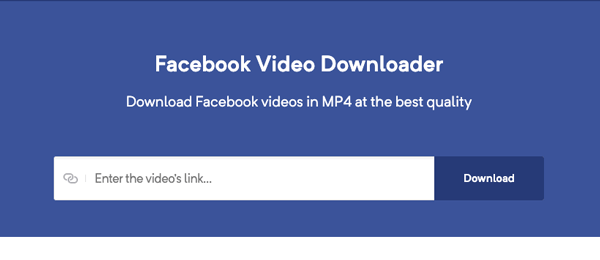
FB Download is much better than FB Down since it comes with a lot of advanced and handy features. From allowing users to download a video in HD, SD, etc. to choose the various resolutions, you can dow everything before downloading a video.
3] Getfvid

Getfvid is another free website that you can use to download Facebook videos without any problem. No matter whether the video is one minute or thirty minutes long, you can download both swiftly. The best thing is that it allows users to download the audio so that users do not need to use any app to remove audio from video. On the other hand, there are two options – Download in HD Quality and Download in Normal Quality. As usual, if you choose the second option, you need to consume less bandwidth than the first one. Visit website
Method #3: Send Facebook Video Via WhatsApp
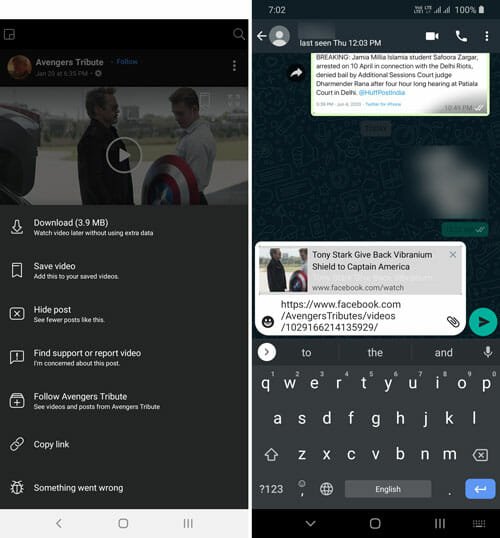
Almost all smartphone users have a WhatsApp account, and you can rely on that platform to share a video even when the recipient doesn’t have a Facebook profile. It is very easy to copy a video link from Facebook and send it via WhatsApp to someone. No matter whether you want to share a video with only one person or an in a group of your friends, you can do both without any issue. To get started, you need to select a video that you want to send. Then, tap on the three-dotted button and select the Copy link option. Now you can paste the link on WhatsApp to send it to your friend, family member, or anybody else.
These are the ultimate methods you can use to share Facebook video with someone, not on Facebook. I hope they will be helpful to you.
Read Next:
Ok when i go to my saved video and click ot, ot just opend like its from a video player. No link shoen, only black space xcept the bvdeo and of course the bar to advance video and stop. Why is mine diffetent. It doesnt have the pic u showed w “share, play again, etc” is this cua iv already saved it and ypur speaking of BEFORE you save one? Im pulling up a video from saved videos. Please help. And not sure how to get back here lol but ill try. Hoping i get an email saying iv got a response
Kimmi
Kimmi0427@yahoo.com
Sorry for typos. No glasses on!!!
Also could it be that i dont have the link above my saved video, or the share, play again functiobs, becuz im mobile on gb app? Ill try on fb website
This is one of the best tools downloading Facebook videos online-https://www.f2mate.com