Facebook Rolls Out Comments System For Blogs And Websites
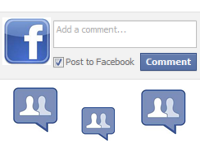 A few days back we told you that Facebook’s is testing a new commenting system which can be used to integrate reader comments feature in any website, just like Disqus and Intensedebate -other third party comment providers. Facebook was indeed experimenting with real time comments on the main website which allows easy updates and likes, without requiring you or any of your friends to refresh the page at all.
Facebook has just added another feature to their social plugin inventory – Facebook’s comment system for blogs and websites.
What Facebook Comments is All about
Facebook’s comment box is yet another social plugin which can be used to gather feedback and comment on webpages. If you’re a blogger or own a website, you can paste a simple code snippet in the source of your website’s template to show Facebook’s comment form and let site visitors comment on your blog post through their Facebook account.

Advantage of Facebook Comments Over Generic Comment Systems
There are a couple of advantages as well as disadvantages of using Facebook’s comments system over other comment providers like Disqus, Intensedebate or even storing the comments on your own blog’s database (WordPress).
Simple Authentication: This commenting model makes life easy for commentators. No more typing in the same name, email address, website URL in the comment box. If a visitor is already logged into his Facebook account, they can simply type in the comment and hit the “Publish” button. That’s it !
Social Relevance: The second advantage is the social feature. Whenever someone posts a comment on your website, the comment is instantly shared on the person’s Facebook profile, which is good for both the user and the owner of the website. The visitor shares his comment and views within his social circle while the site owner gets some free publicity and traffic.
Facebook says that their comments box uses social signals to surface the high quality comments for each user. The comments are automatically ordered so that the user sees the most relevant comments from his Facebook friends, friends of friends and so on. It’s obvious that Facebook wants to bring a new twist to the discussion by inviting the social signal game into the picture.
A user can quickly spot whether any of his Facebook friends has commented on this specific blog post and engage himself in the discussion. Great thought !
Social Sharing for Comments: If you select the checkbox “post to Facebook” while posting a comment in Facebook’s comment box, the comment is instantly shared on your Facebook news feed. This is cool, no longer you have to share the same page manually using the site’s in built social buttons (if any).
Moderation And Spam Control: Of course ! Facebook comments can be moderated from Facebook apps dashboard and you can selectively delete specific comments which you don’t want to show.
Other features include blacklisting specific words or phrases and it’s no wonder that Facebook will roll out more advanced comment moderation and notification in the coming days. And since posting a comment using Facebook’s comment form would expose who you are, spammers and link brokers would have a tough day spamming the comments section of your blog with irrelevant comments.
Less Load On Your Database: Since the comments are stored with Facebook, your blog’s database will have less load but I don’t think this as any major advantage or reaon for switching to Facebook comment social plugin.
Disadvantages of Adding Facebook Comments Social Plugin
No Anonymous comments: The first disadvantage is that a person can’t comment on your website, if he wants to remain anonymous. Which means, a non Facebook user who does not have a Facebook account can not post a comment which kinds of forces the commentator to either sign up for Facebook or leave the webpage without commenting.
Slow Loading Time: Imagine one of your blog posts went viral on the web and the article attracted hundreds of comments from other Facebook users. This will definitely have an impact on your site’s overall loading time, hence slowing down your blog.
Migration (not clear yet): If for any reason you want to migrate all the comments from Facebook to any third party comment provider, you can’t. Facebook hasn’t disclosed whether they would allow web publishers to migrate existing comments out of Facebook’s social plugin.
Facebook is also working to bring other open ID providers into the commenting model, which means they will allow users to sign in with their open ID account and comment on the webpage in question.
Adding Facebook’s Comment System To Your Blog
It looks like the developers are working on something as the code for adding Facebook comments in a webpage isn’t working currently. We tried to generate the embed code for Facebook comments, but the code was never shown.
Update 1: Several other users have also reported the same bug. Currently, the comment box code for Facebook isn’t working as it should.
Update 2: Finally it’s fixed. Here is how to add Facebook’s comment box to your WordPress, blogger blogs, forums or other websites:
1. Copy the following code and paste it on the source of your website’s template:
<script src=”http://connect.facebook.net/en_US/all.js#xfbml=1″>
</script><fb:comments href=”YOUR_CANONICAL_URL”></fb:comments>
2. Remember to replace “YOUR CANONICAL URL” with the actual URL of the page in question. For dynamic blogs like WordPress and blogger, you have to use the permalink notation of the blog post e.g <?php the_permalink(); ?> for WordPress.
3. If you want to add comment moderation to Facebook’s comment box, register for a Facebook application and note the App ID.
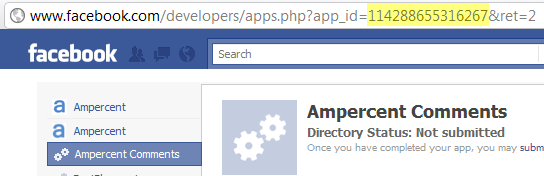
4. Next include the following code before the </head> section of your blog template, where you are going to show the comment form.
<meta property=”fb:app_id” content=”{YOUR_APPLICATION_ID}”>
Remember to replace YOUR_APPLICATION_ID with the actual ID of your Facebook comments application.
5. To receive notifications on every comment posted to the Comment Box, add the following code before the </head> section, replacing YOUR_USER_ID with the user id of the registered Facebook comment application.
<meta property=”fb:admins” content=”{YOUR_USER_ID}”>
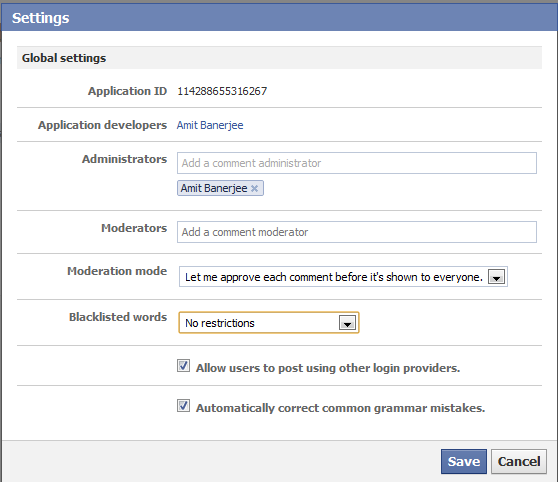 That’s it, you have successfully added Facebook comment plugin on your blog and can receive notifications of new comments directly on Facebook. To moderate and tweak the comment box according to your needs, go to http://developers.facebook.com/tools/comments?id=yourappdid
Facebook Comments Form Demo
You can check out a demo webpage for Facebook’s comment form here.
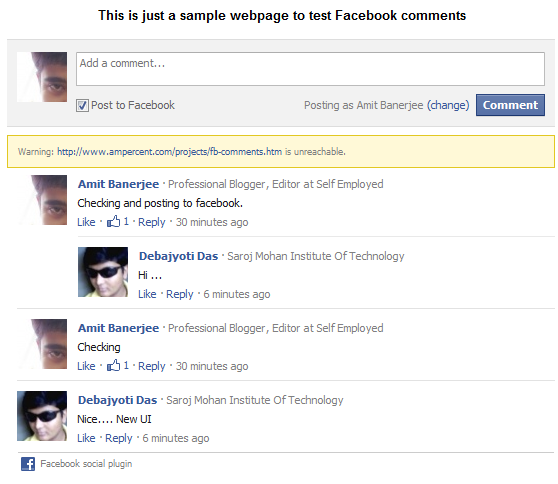
Here is how Faceboo’s comment form social plugin looks on the test page
 And here is how you can get notifications of new comments posted on your website, directly at your Facebook account.

As of this blog, no I haven’t added Facebook’s comment form yet but considering Facebook’s growing popularity, I might.
What about you? Did you liked Facebook’s new commenting model for blogs or websites ? Will you be adding Facebook social plugin for comments in your blog ? Share your ideas in the comments below.

how can I add a comment box for each of my news item?
excellent issues altogether, you simply won a brand new reader.
What would you recommend about your publish
that you just made some days in the past? Any certain?
I read this paragraph completely concerning the resemblance of latest and preceding technologies, it’s awesome article.
I am truly grateful to the owner of this website
who has shared this great paragraph at at this time.
What’s up,I log on to your new stuff named “Add Facebook Comment Box Social Plugin To Blogs, Websites” regularly.Your story-telling style is awesome, keep it up! And you can look our website about proxy list.